Learn how to design a notification strategy for Event-Driven architectures.
This document describes an implementation suggestion of a centralized notification mechanism for event-driven integrations on the Digibee Integration Platform. The goal is to ensure that important events, especially errors, are communicated in a reliable and scalable way, allowing systems and users to respond appropriately.
For more details on event-driven integrations on the Digibee Integration Platform, read the following articles:
In an asynchronous integration environment, events can be triggered by multiple systems, requiring a robust mechanism to notify consumer systems or end users. The notification model proposed in this document addresses these challenges by considering:
Low latency upon delivery of the notification.
Delivery guarantee with resend attempts.
Flexibility for sending via different channels (email, webhook, queue, and so on).
Observability for event tracking.
Error handling with centralized repository and predefined rules.
Architecture
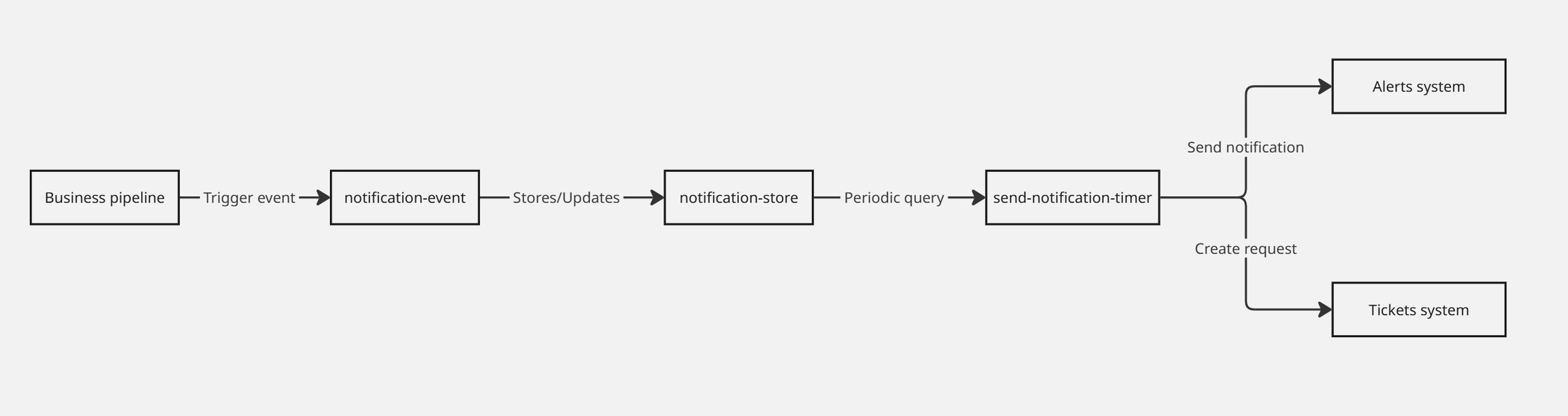
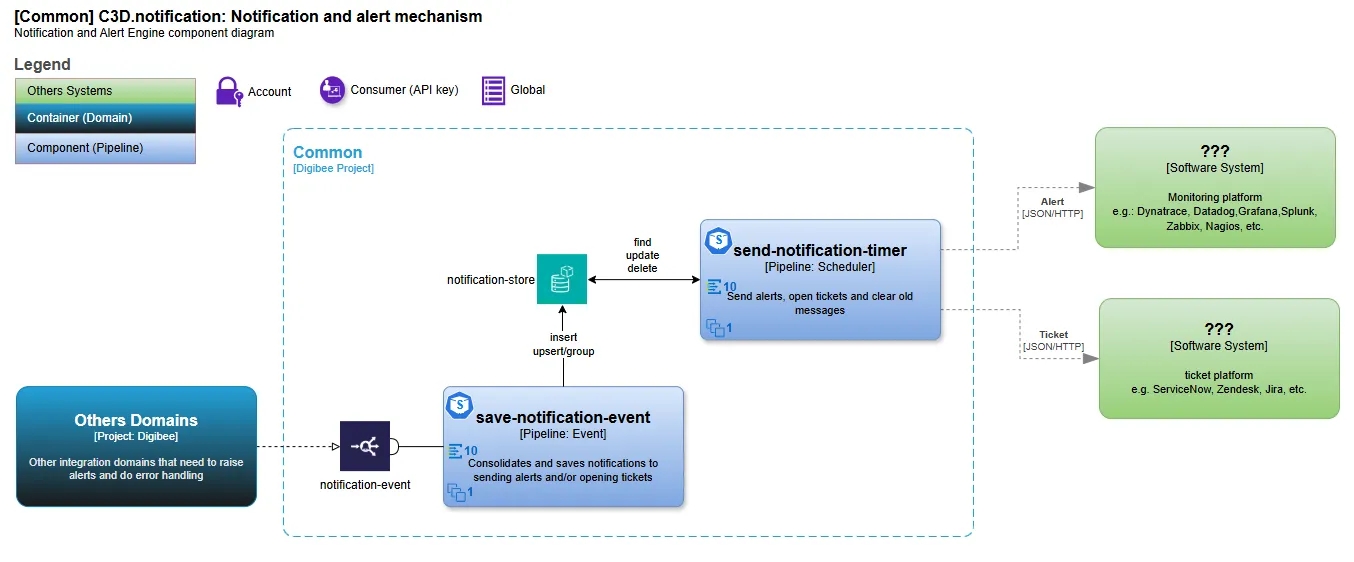
The implementation of the notification model follows an event-based architecture, where:
Event trigger: Any business pipeline can trigger the pipeline save-notification-event via Digibee event called notification-event.
Notification storage: The pipeline save-notification-event inserts or updates record in the notification-store Object Store, ensuring that duplicate messages are not stored within the defined time interval.
Processing and sending the notification: A second pipeline, send-notification-timer, periodically consults the records stored in the notification-store and sends notifications based on established rules.
Delivery to destination: Notifications are sent to your preferred systems, such as alert systems (Dynatrace, Datadog, Grafana, email) or ticket opening systems (ServiceNow, Zendesk, Jira).
Flow diagrams
Implementation at Digibee
Pipeline configuration
save-notification-event pipeline:
Receives an event notification-event.
Checks if the message already exists in the notification-store.
Inserts a new record or updates an existing one, increasing the occurrence counter.
Defines the waiting time before sending the alert.
send-notification-timer pipeline:
Retrieves records from notification-store paging the search every 500 records.
Applies criticality rules to define the destination of the notification.
Calculates shipping time based on alertWaitTime.
Sends the notification to the appropriate system.
Example of payloads
Event entry notification-event (Example for ServiceNow and Dynatrace)Storage in notification-store
Avoid duplication: Repeated messages are not allowed in the same pipeline within the defined interval.
Updating existing records: If the key already exists, the occurrence counter is incremented.
Shipping time: The publisher defines the waiting time.
Criticality defines the destination:
Level 1: Call only (ex: ServiceNow)
Level 2: Alert only (ex: Dynatrace)
Level 3: Alert + call (ex: Dynatrace and ServiceNow)
Observability and monitoring
To ensure the reliability of notifications, it’s recommended:
Structured logging to track events and errors.
Metrics such as success rate and response time.
Alerts for recurring failures.
Conclusion
This notification model ensures reliable and scalable delivery of error messages in event-driven architectures. With Digibee, it’s possible to implement this model in a flexible and integrated way with existing systems, allowing automation and complete traceability of critical notifications.