> For the complete documentation index, see [llms.txt](https://docs.digibee.com/documentation/llms.txt). Markdown versions of documentation pages are available by appending `.md` to page URLs; this page is available as [Markdown](https://docs.digibee.com/documentation/resources/best-practices/building-a-pipeline.md).
# Best practices for building a pipeline
Follow these best practices to ensure your pipelines are secure, efficient, and well-structured.
Before deploying a pipeline, review these key points to safeguard your integration flows:
## **Use API Keys**
If your pipeline includes [**HTTP**](/documentation/connectors-and-triggers/triggers/web-protocols/http.md), [**REST**](/documentation/connectors-and-triggers/triggers/web-protocols/rest.md), or [**HTTP File**](/documentation/connectors-and-triggers/triggers/web-protocols/http-file.md) triggers, the services created will be exposed to the internet. To improve security, the Digibee Integration Platform requires these triggers to be used with an API key by default. Learn [how to create an API key](/documentation/platform-administration/settings/api-keys-consumers.md).
Use a separate API key for each system consuming an API and restrict access to only the necessary pipelines.
For additional security, we recommend implementing [JWT (JSON Web Token) authentication](/documentation/connectors-and-triggers/connectors/security/digibee-jwt/digibee-jwt-implementation.md).
{% hint style="danger" %}
**Exception:** If you need to publish a pipeline with these triggers without an API key (not recommended), submit a request via chat using the following template:
*I request the inclusion of the following pipelines in the whitelist to not require an API key.*
* *Realm name*
* *Names of the pipelines to be included in the realm’s whitelist*
* *Reason for the request*
{% endhint %}
## **Store usernames and passwords securely**
Never expose login credentials directly in connector settings. Instead, store them on the [**Accounts**](/documentation/development-cycle/build-overview/accounts.md) page and reference them in the configuration form of the connector.
## **Obfuscate sensitive fields**
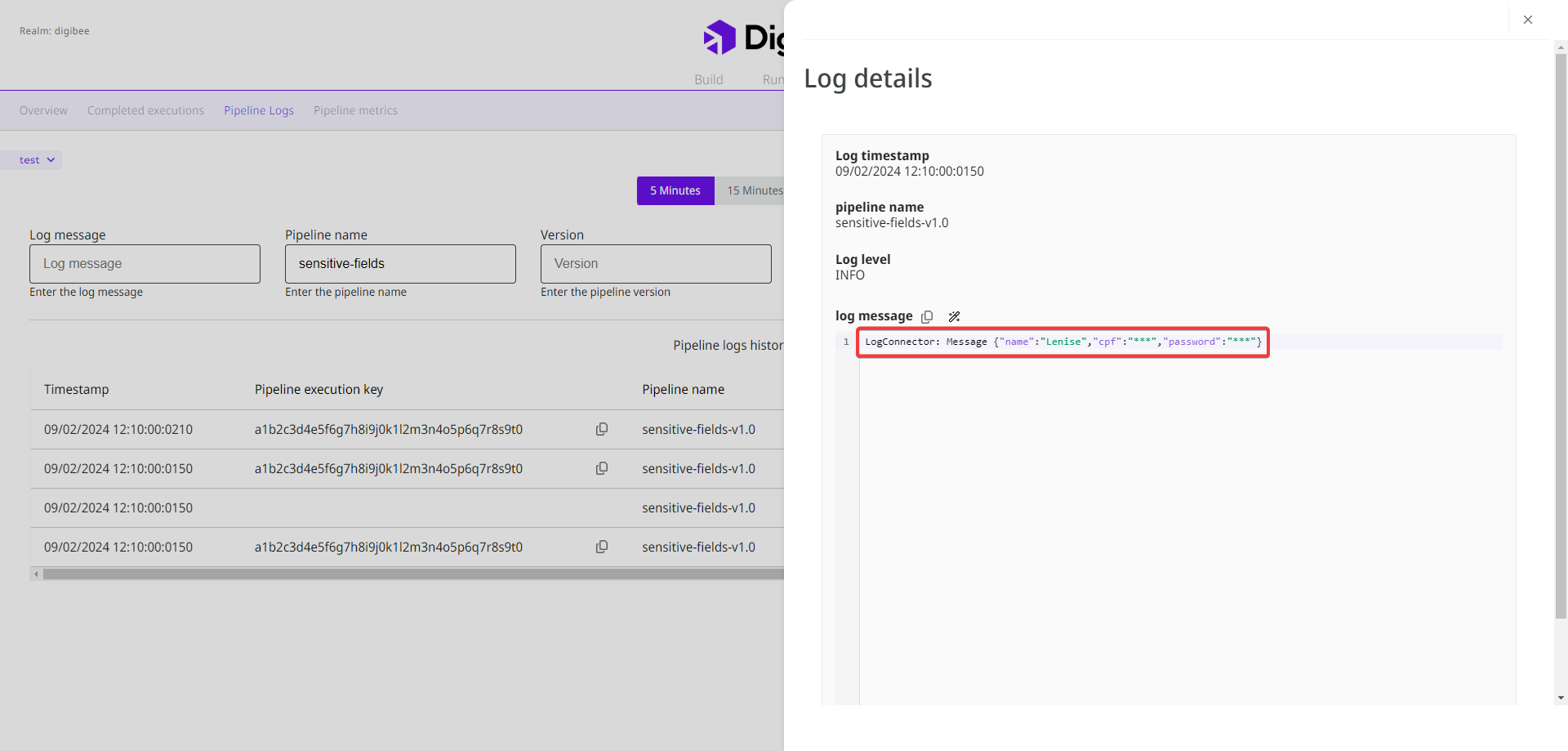
Configure sensitive fields in the [pipeline settings](/documentation/development-cycle/build-overview/pipelines/how-to-create-a-pipeline.md) or the [Sensitive Fields Policy](/documentation/platform-administration/governance/policies/security/sensitive-fields.md) to automatically hide them in logs and messages. This prevents data exposure during integration, reducing security risks. Obfuscated fields are replaced with "\*\*\*".
Learn how to obfuscate sensitive fields at the [pipeline](/documentation/development-cycle/build-overview/pipelines/how-to-create-a-pipeline.md) and [realm levels](/documentation/platform-administration/governance/policies/security/sensitive-fields.md).
## **Use HTTPS instead of HTTP**
Whenever possible, use **HTTPS** for external service requests to improve security.
## **Encrypt and clear Object Store data**
* **Encrypt** sensitive data stored in an [**Object Store**](/documentation/connectors-and-triggers/connectors/structured-data/object-store.md) using cryptography connectors.
* **Clear** the **Object Store** periodically. Object Stores are auxiliary databases that support you in the development of integration flows. They are not intended to store large amounts of data. If you don’t clear your Object Store regularly, this can lead to errors in your integration flows.
## **Use the Script connector only when necessary**
The [**Script (JavaScript)**](/documentation/connectors-and-triggers/connectors/tools/script.md) connector runs on a separate infrastructure outside the pipeline. This configuration can slow down processing and, since the infrastructure is shared, intensive use can cause delays in multiple pipelines.
To avoid this, use dedicated connectors like [**Transformer (JOLT)**](/documentation/connectors-and-triggers/connectors/tools/jolt-v2.md), [**JSLT**](/documentation/connectors-and-triggers/connectors/tools/jslt.md), [**JSON Transformer**](/documentation/connectors-and-triggers/connectors/tools/json-transformer.md), and [**JSON Generator (Mock)**](/documentation/connectors-and-triggers/connectors/tools/json-generator.md) for data transformation and mapping whenever possible. These connectors are built into the pipeline and work more efficiently. Only use **Script (JavaScript)** when JavaScript is the only option.
{% hint style="success" %}
Not sure if you need the **Script (JavaScript)** connector? [Contact our team](/documentation/troubleshooting/help-and-faq/support.md). We may have a better solution using other connectors.
{% endhint %}
## **Validate responses from external services**
When integrating with external services, such as an API or database, always verify that the response type matches expectations. If it doesn’t, take appropriate action, such as reprocessing or handling the error.
For more details, refer to our documentation on [event-driven architecture](/documentation/resources/best-practices/event-oriented-architecture.md).
---
# Agent Instructions
This documentation is published with GitBook. GitBook is the documentation platform designed so that both humans and AI agents can read, navigate, and reason over technical content effectively. Learn more at gitbook.com.
## Querying This Documentation
If you need additional information that is not directly available in this page, you can query the documentation by asking a question.
Perform an HTTP GET request on the following URL with the `ask` and `goal` query parameters:
```
GET https://docs.digibee.com/documentation/resources/best-practices/building-a-pipeline.md?ask=&goal=
```
`ask` is the immediate question: it should be specific, self-contained, and written in natural language.
`goal` is what the user is ultimately trying to achieve, the reason they need the answer. Sharing it helps GitBook give you a better, more relevant answer. A goal is most helpful when it describes the outcome the user wants rather than restating the question. For example, with `ask=how do I create an API token`, a goal like `automate deployments from our CI pipeline` lets GitBook tailor the answer to that use case.
The response will contain a direct answer to the question and relevant excerpts and sources from the documentation.
Use this mechanism when the answer is not explicitly present in the current page, you need clarification or additional context, or you want to retrieve related documentation sections.