# Secure your APIs with JWT in Digibee

JSON Web Tokens (JWTs) enable the secure and efficient exchange of information between parties. By incorporating JWTs, you can **authenticate users and authorize them to access specific resources or perform actions within a service**.

In this use case, we will explore:

* Best practices for implementing JWTs securely.
* How to avoid common pitfalls, such as including sensitive data in tokens.
* Practical steps for utilizing JWT connectors within the Digibee Integration Platform.

## JWT best practices

Here are some of the key practices you should follow:

**Avoid including sensitive data in JWTs**: While the data in the token is encoded in base64, it is not encrypted or hashed, meaning anyone with access can decode and view the content of the Header and Payload, excluding the Signature.

**Use short expiry times:** JWTs should have short expiration times to minimize the risk of a compromised token being used maliciously. A short-lived token helps limit the impact of a token being exposed. You can configure the expiration time directly in the connector's configuration.

**Monitor token usage:** It's important to monitor the usage of JWTs to detect any anomalies or unauthorized access attempts. You can log and track the usage of each token by associating it with the pipeline’s execution key `{{ metadata.execution.key }}`.&#x20;

**Use scopes when access needs to be restricted:** Include scopes when there’s a need to enforce granular permissions or validate access against specific roles or resources. For example, if a token is intended to access sensitive operations, ensure appropriate scopes are defined (read, write, etc.).

## JWT within the Digibee Integration Platform

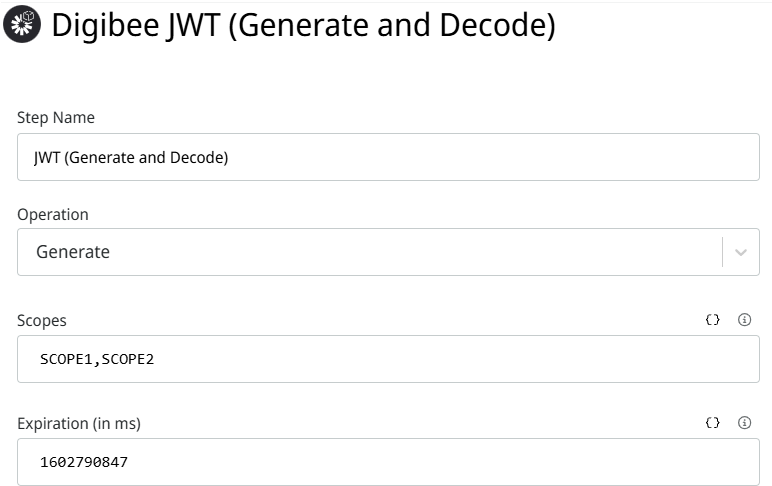
<figure><img src="https://content.gitbook.com/content/aD6wuPRxnEQEsYpePq36/blobs/ALFod1GNBFQ7yT7SifXI/Digibee%20JWT.png" alt=""><figcaption><p>Configuration of the Digibee JWT (Generate and Decode) Connector.</p></figcaption></figure>

Digibee offers two distinct JWT connectors, each designed for specific use cases: [JWT V2](https://app.gitbook.com/s/EKM2LD3uNAckQgy1OUyZ/connectors/security/jwt) and [Digibee JWT (Generate and Decode)](https://app.gitbook.com/s/EKM2LD3uNAckQgy1OUyZ/connectors/security/digibee-jwt). Both enable integration and security within pipelines but differ in capabilities and application focus.

1. [JWT V2](https://app.gitbook.com/s/EKM2LD3uNAckQgy1OUyZ/connectors/security/jwt) is a connector that generates  generic **JWTs for external systems**. It supports the creation of both JWS (JSON Web Signature) and JWE (JSON Web Encryption) tokens, as well as verifying and decoding them. JWT V2 accommodates diverse cryptographic algorithms for public, private, and secret key usage.
2. [Digibee JWT (Generate and Decode)](https://app.gitbook.com/s/EKM2LD3uNAckQgy1OUyZ/connectors/security/digibee-jwt) is a connector tailored for internal platform communications. It simplifies JWT token generation and decoding, primarily for enabling authentication in pipelines using REST or HTTP Triggers. **The connector is for Digibee’s ecosystem**.

### When to use each connector

<table data-full-width="true"><thead><tr><th>Connector</th><th>JWT V2</th><th>Digibee JWT</th></tr></thead><tbody><tr><td>Use case</td><td>External integrations with third-party APIs</td><td>Internal communication within Digibee pipelines</td></tr><tr><td>Token types</td><td>JWS, JWE</td><td>JWT</td></tr><tr><td>Supported algorithms</td><td>Broad cryptographic support</td><td>Simplified for internal use</td></tr><tr><td>Ideal for</td><td>High-security encryption/signature needs</td><td>Lightweight internal pipeline authentication</td></tr></tbody></table>

## Understanding the JWT Authentication Flow

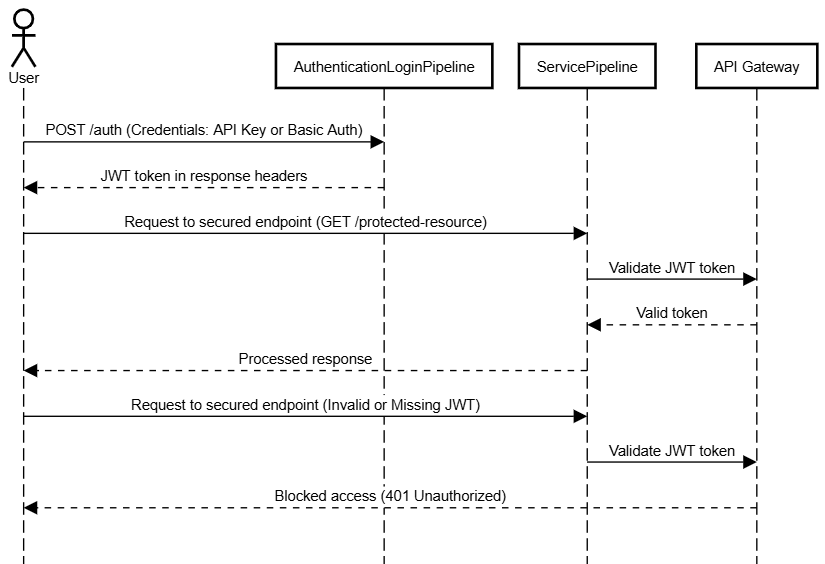
Before exploring the hands-on steps, it's essential to understand how the components interact during the JWT authentication process in the Digibee Integration Platform. The sequence diagram below illustrates the flow of communication between the **User**, the **AuthenticationLoginPipeline** and the **ServicePipeline**:

<figure><img src="https://content.gitbook.com/content/aD6wuPRxnEQEsYpePq36/blobs/OwuuvjH9FVZiydJ9V2g4/diagrama_JWT.png" alt=""><figcaption></figcaption></figure>

1. ### User Actions

The process begins when the user sends a **POST request** to `/auth` in the **AuthenticationLoginPipeline** with their credentials (either **API Key** or **Basic Auth**).&#x20;

Upon successful authentication, the **AuthenticationLoginPipeline** returns the JWT token in the **response headers**. This token must then be included in the **Authorization header** of subsequent requests to access secured endpoints (for example, `GET /protected-resource`).

### 2. Service Pipeline's Role

The **ServicePipeline** is responsible for validating the JWT token during subsequent requests. This pipeline operates with the following steps:

* **JWT validation:** When the user sends a request with a JWT token in the **Authorization header**, the **ServicePipeline** validates the token. **Digibee's API Gateway** is responsible for enforcing the token validation. If the token is valid, the **ServicePipeline** proceeds with processing the request.
* **Access Control:** If the JWT token is invalid or missing, the API Gateway blocks access to the **ServicePipeline**, ensuring that only authorized users can access secured resources.&#x20;

## Putting theory into practice

The following use case illustrates the phases of how to leverage the **JWT (Generate and Decode)** connector to create a login authentication pipeline that generates a JWT token for access to internal APIs. This practical implementation follows the **AuthenticationLoginPipeline** flow discussed earlier.

Here’s the step-by-step implementation:

### Configure the Trigger

1. Create a new pipeline and add a [REST Trigger](https://app.gitbook.com/s/EKM2LD3uNAckQgy1OUyZ/triggers/web-protocols/rest).
2. In the trigger settings, enable the following options: **External API** and **API Key**.

### Extract Relevant Data

1. Use a **Transformation connector** to process the incoming request body.
2. Extract the necessary data fields to be included in the JWT payload, such as:
   * `userID`
   * `role`
   * Other identifiers required for authorization.

{% hint style="info" %}
**Security Tip:** Exclude sensitive information (for example, passwords or transaction details).
{% endhint %}

### Store the Extracted Data

1. Save the extracted data to the pipeline’s execution memory using a [Session Management](https://app.gitbook.com/s/EKM2LD3uNAckQgy1OUyZ/connectors/structured-data/session-management) **connector**. This ensures the data is accessible for subsequent steps in the pipeline.

### Clear Payload Fields

1. If sensitive information is present in the payload, remove it before proceeding (an empty [JSON Generator](https://app.gitbook.com/s/EKM2LD3uNAckQgy1OUyZ/connectors/tools/json-generator) would do the trick).
2. Retain only the fields essential for the JWT payload.

### Generate the JWT

1. Add the [Digibee JWT (Generate and Decode)](https://app.gitbook.com/s/EKM2LD3uNAckQgy1OUyZ/connectors/security/digibee-jwt) connector to your pipeline.
2. Configure the following:

* **Operation Type**: Select **Generate** to create the JWT token.
* **Scopes**: Optionally define scopes to specify permissions or access levels (for example, `read`, `write`). Leave this field empty if not needed.
* **Expiration Time:** Set a validity period for the token.

{% hint style="info" %}
Ensure the pipeline is deployed to a test or production environment before attempting to generate or retrieve the JWT.
{% endhint %}

### Create a Transaction ID (Optional)

To improve traceability, generate a unique **Transaction ID** for the flow. For example, use the pipeline's execution key: `{ "transactionId": {{ metadata.execution.key }} }`

### JWT in the Authorization Header

* The generated JWT will be added to the **Authorization Header** of the response.
* This token can now be used by other services to make authenticated API calls.

<figure><img src="https://content.gitbook.com/content/aD6wuPRxnEQEsYpePq36/blobs/1DQuPkSXhTSNl6oUcUDJ/pipeline_JWT.png" alt=""><figcaption><p>This image illustrates a JWT generation pipeline, highlighting key stages as described in the implementation above.</p></figcaption></figure>

## Final thoughts

Security is a shared responsibility among all teams involved in integration development. Each team member has a role in implementing and maintaining security practices to minimize risks and build secure, reliable integrations.

If you are new to security concepts, we recommend exploring the '[Key practices for securing sensitive information](https://docs.digibee.com/documentation/resources/use-cases/key-practices-for-securing-sensitive-information)' Use case, which covers fundamental principles for safeguarding data. This will complement your understanding of JWT implementation and enhance your overall security practices.

You can explore more possibilities in our [Documentation Portal](https://docs.digibee.com/), [Digibee Academy](https://digibee.academy/courses/advanced-security/) for courses on Advanced Security, or visit our [Blog](https://www.digibee.com/blog/) to discover more resources and insights.

\
If you have feedback on this 'Use case  or suggestions for future articles, share your thoughts on our [feedback](https://forms.gle/HZc5KbFdgtBQ2Fz87) form.