API Trigger
Learn more about the API Trigger and how to use it on the Digibee Integration Platform.
The API Trigger exposes an integration through a REST endpoint. When a pipeline is configured and deployed with this trigger, a REST endpoint is automatically generated. You can view this endpoint on the pipeline card in the Run page after deployment.
Routes List configuration
To start configuring the trigger, follow these steps to set up the Routes List:
In the Routes List section, click Add.
Enter the Path (for example, "/users").
Select the appropriate Method.
Add a description in the Summary (such as "Retrieves all users").
After creating the route, it will appear in the Routes List. You can add new routes, edit existing routes, or delete them.
Alternatively, you can create a pipeline with an OpenAPI specification file. Learn more about how to scaffold a pipeline using an OpenAPI specification.
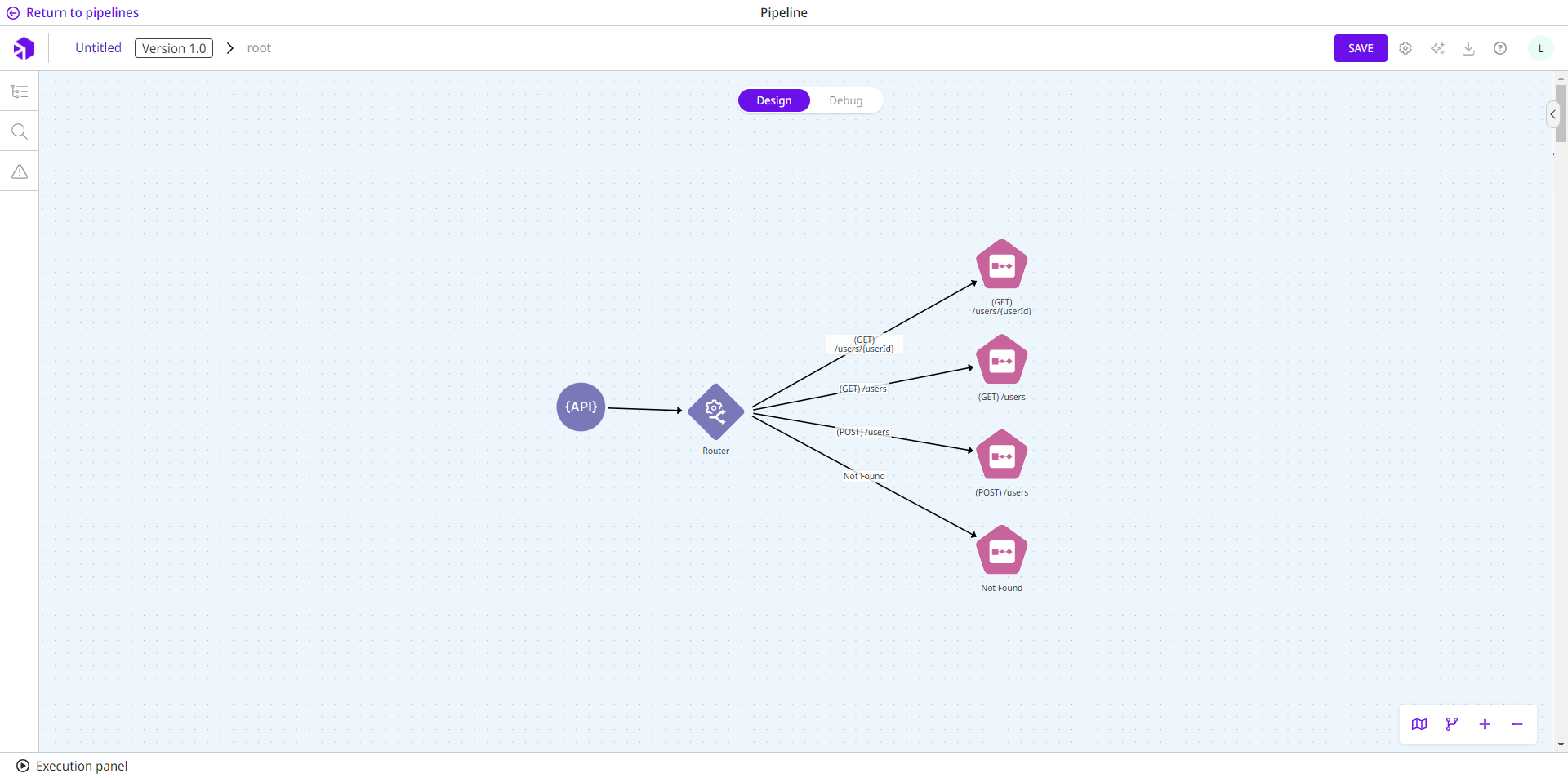
Visual representation of the routes
Once you save the configuration of the trigger, a visual representation of the routes is displayed in the pipeline.

The routes can only be edited through the trigger's configuration form. After saving, any changes will be immediately reflected in the pipeline.
Each route is connected to a Block Execution connector, which is designed to logically separate the integration into different subflows for easier pipeline management. To complete the configuration, you will need to create the flows for each route within the OnProcess and OnException subflows.
Important information:
If you create the flow before configuring the trigger, the existing connectors will be disconnected once the trigger is configured.
Deleting a route from the Routes List will disconnect the Block Execution connector for that route from the main flow.
Changing the API Trigger to another type of trigger will convert the Router into a Choice connector, and the previously configured routes will automatically be connected to the Choice.
In each of these cases, you can copy the connectors within each Block Execution and paste them elsewhere in the pipeline.
Parameters
Take a look at the configuration parameters for the trigger. Parameters supported by Double Braces expressions are marked with (DB).
Maximum Timeout
Maximum time (in milliseconds) for the pipeline to process information before returning a response. Limit: 900000 ms.
30000
Integer
The Maximum Allowed Request Size In Mb
Maximum size of the payload (in MB). The maximum configurable size is 5 MB.
5
Integer
Response Headers (DB)
Headers returned by the endpoint when the pipeline processing is complete. This parameter is mandatory.
N/A
String
Add Cross-Origin Resource Sharing (CORS)
Enables the addition of CORS headers.
False
Boolean
CORS Headers
CORS headers returned by the endpoint when the pipeline processing is complete. Available only if the Add Cross-Origin Resource Sharing (CORS) parameter is active.
N/A
Key-value pair
External API
If active, publishes the API in an external gateway.
True
Boolean
Internal API
If active, publishes the API in an internal gateway. Both the External API and Internal API options can be active simultaneously.
False
Boolean
mTLS Enabled API
If active, publishes the API to a dedicated gateway with mTLS enabled by default.
False
Boolean
API Key
If active, the endpoint can only be consumed if an API key is configured on the Digibee Integration Platform.
False
Boolean
Token JWT
If active, the endpoint can only be consumed if a JWT token generated by another endpoint is sent. Read more in the article about JWT implementation.
False
Boolean
Basic Auth
If active, the endpoint can only be consumed if Basic Auth is present in the request. This setting can be registered beforehand through the Consumers page in the Digibee Integration Platform.
False
Boolean
Rate Limit
If active, applies rate limiting on the API gateway. Available only if the API Key or Basic Auth parameters are active.
False
Boolean
Limit by
Defines the entity to which the limits will be applied. Available only if the Rate Limit parameter is active.
API
String
Aggregate by
Defines the entity for aggregating the limits. Options: Consumer and Credential (API Key, Basic Auth). Available only if the Rate Limit parameter is active.
Consumer
String
Options
Defines the limit of requests that can be made within a time interval. Available only if the Rate Limit parameter is active.
n/a
Options of Rate Limit
Interval
Defines the time interval for the limit of requests. Options: second, minute, hour, day, and month. Available only if you add a new Option.
second
String
Limit
Defines the maximum number of requests that users can make in the specified time interval. Available only if you add a new Option.
n/a
Integer
Allow Redelivery Of Messages
If active, allows the message to be resent if the Pipeline Engine fails. Read more in the article about the Pipeline Engine.
False
Boolean
Documentation
Section for documenting any necessary information about the trigger configuration and business rules.
N/A
String
There is a global configuration parameter that specifies that all pipelines must be published with at least the API Key or Basic Auth options enabled.
Parameters additional information
Further details on the parameters can be found below:
The Maximum Allowed Request Size In Mb
If the payload sent by the endpoint consumer exceeds the limit, a message is returned indicating that the maximum size has been exceeded, along with a status code 413 and the following message:
Add Cross-Origin Resource Sharing (CORS) - CORS Headers
Cross-Origin Resource Sharing (CORS) is a mechanism that allows you to tell the browser which origins are allowed to make requests. This parameter defines CORS specifically for the pipeline and its constraints. To configure this globally and not individually for each pipeline, see the CORS HTTP header policy.
You can use a comma to enter multiple values in a header, but you should not insert a space before or after the comma. In addition, no special characters should be used in the keys, as this can lead to errors in proxies and gateways.
mTLS enabled API
You can enable the External API and Internal API options together with mTLS enabled API, but we recommend leaving them disabled. This parameter does not support API Key, Token JWT, or Basic Auth.
To use this in your realm, you need to make a request through support and we will send you the necessary information to install this service.
Rate Limit
When creating APIs, it’s common to limit the number of API requests that users can make in a given time interval.
You can do this by enabling the Rate Limit option and applying the following settings:
Limit: API
Aggregate by: Credential (API Key, Basic Auth)
Options:
Item 1:
Interval: second
Limit: 100
Item 2:
Interval: minute
Limit: 1000
Item 3:
Interval: hour
Limit: 5000
If the API has additional paths, the limit is shared among all paths. To apply the rate limit settings, the API must be configured with an API Key or Basic Auth. In this way, the Aggregate by parameter can be used for groups of credentials if the Consumer option is selected, or for a single credential if the Credential (API Key, Basic Auth) option is selected.
If several interval parameters with repeating values are configured, only one of these values is taken into account. It’s also necessary that a value greater than zero is specified for the Limit parameter.
If the rate limit options are not set correctly, they are ignored and a warning log is issued. You can view this log on the Pipeline Logs page.
Last updated
Was this helpful?