Choice
Discover more about the Choice connector and how to use it on the Digibee Integration Platform.
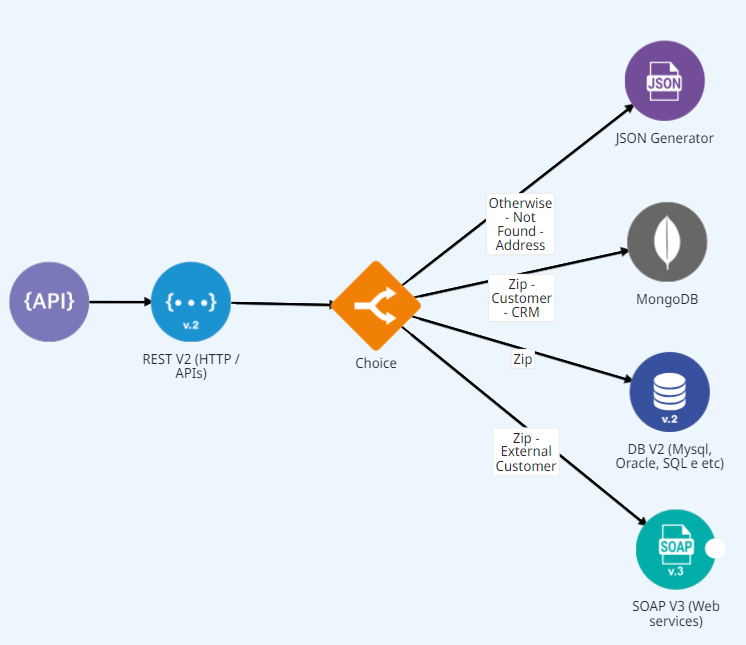
Choice allows flows to take different paths inside a pipeline. It's part of a connector set that helps with the integration organization.
The configuration parameters will not be available if the connector is not connected to other connectors in the pipeline. Once you connect it properly, just click at the connection point and then in the gear icon to access the parameters as shown in the image detail below:

Parameters
Configure the connector using the parameters below. Fields that support Double Braces expressions are marked in the Supports DB column.
Label
Defines the path name. It must be a unique name that can be repeated in the pipeline.
String
❌
N/A
Type
Defines the structure of the different path your flow should take (When or Otherwise). Read the Type section to learn more.
String
❌
When
Type Rule
Defines the language type (Double Braces, JSON Path or Simple), which will be used for the condition declaration (every time When gets chosen in the Type parameter). Read the Type Rule section to learn more.
String
❌
JSON Path
Condition
Declares the condition used to define if the path must be executed. When the previously defined conditions generate conflict or cause an overlap, only one of them will be executed (every time When gets chosen in the Type parameter).
String
✅ (if Double Braces type rule is selected)
$
Type
To work with this connector, you must understand the two structure types used to create paths within a Choice:
When: Defines a specific condition that directs the flow to a new execution line. At least one "When" condition must be declared.
Otherwise: Executes the flow when none of the "When" conditions are met. No additional condition is required for this path.
Type Rule
When configuring a Choice connector, you can select the type rule. This allows you to choose the language that best fits your condition: Double Braces, JSON Path, or Simple expressions.
Double Braces
Allows you to write branch conditions using Double Braces expressions, a syntax created exclusively to be used on Digibee Integration Platform. It is the most powerful option, as it supports built-in functions, previous step references, and payload data. Every Double Braces expression used in a Choice branch must return a boolean value (true or false).
Supported operations for Double Braces
Conditional functions
Functions that compare values and return booleans.
EQUALTO, GREATERTHAN, ISNULL, etc
Previous step references
Access data from any previous step in the flow.
step.stepName.response.field
Payload data access
Direct access to the input data of the flow.
$.data.field
Logical operators
Standard Double Braces logic for complex rules.
AND(condition1, condition2)
JSON Path
Defines expressions that go through a JSON component to reach a subset. Whenever you use Choice, a match will be made for the path execution.
Imagine that, in the path that comes before Choice, your data flow has the following output:
The following condition declared as When validates the path your flow should take:
Know the other options for the JSON Path declaration:
$
The object root or array.
.property
Selects a specific object in the related object.
['property']
Selects a specific property in the related object. Be sure to put only single quotes around the property name. Tip: consider this instruction if the property name has specific characters, such as spaces, or begins with a character other than A..Za..z_.
[n]
Selects the n-th element of an array. The indexes start with 0.
[index1,index2,…]
Selects array elements with specific indexes and returns a list.
..property
Recursive descent: searches for a specific property name recursively and returns an array with all the values with this property name. It always returns a list even if only 1 property is found.
*
Wildcard selects all the elements in an object or array, no matter that their names or indexes are. For example, address.* means all the properties of the address object and book[*] means all the items inside a book array.
[start:end] / [start:]
Selects elements of a start array and even, although not necessarily, an end array. If the end is omitted, select all the arrays until the end of the array. A list is returned.
[:n]
Selects the first n elements of the array. A list is returned.
[-n:]
Selects the last n elements of the array. A list is returned.
[?(expression)]
Filter expression. It selects all the elements in an object or array that match the specified filter. A list is returned.
[(expression)]
Script expressions can be used instead of explicit property names or indexes. For example, [(@.length-1)], that selects the last item of an array. Here, the length refers to the current array length more than a JSON file named "length".
@
Used for filter expressions to make reference to the current node that is being processed.
==
Equal to. 1 and '1' are considered the same result. String values must be attached in single quotes (and not in double quotes): [?(@.color=='red')].
!=
Different than. String values must be attached in single quotes.
>
Greater than.
>=
Greater than or equal to.
<
Less than.
<=
Less than or equal to.
=~
Compatible with a JavaScript RegEx. For example, [?(@.description =~ /cat.*/i)] matches items whose descriptions start with "cat" (case-insensitive).
!
Used to deny a filter. For example, [?([email protected])] matches items that don't have the "isbn" property.
&&
Logical AND operator. Example: [?(@.category=='fiction' && @.price < 10)]
||
Logical OR operator. Example: [?(@.category=='fiction' || @.price < 10)]
Read this JSON Path article to learn more about the topic.
Simple
It's basically a small and simple language to evaluate expressions and predicates without demanding new dependences or JSON path knowledge.
Imagine that, in the path that comes before Choice, your data flow has the following output:
The condition declared as When validates the path your flow should take:
Know the other options for the Simple declaration:
==
Equal to.
=~
Equal to, case-insensitive when comparing strings.
>
Greater than.
>=
Greater than or equal to.
<
Less than.
!=
Different.
!=~
Different than, case-insensitive when comparing strings.
regex
Validates if a string matches the specified RegEx. Example: #{city} regex 'New.*'
&&
Logical AND operator. Example: #{city} == 'New York' && #{state} == 'NY'
||
Logical OR operator. Example: #{city} == 'New York' || #{state} == 'CA'
Example:

Last updated
Was this helpful?