
File Writer
Discover more about the File Writer component and how to use it on the Digibee Integration Platform.
File Writer allows information to be written in a file.
Parameters
Take a look at the configuration parameters of the component. Parameters supported by Double Braces expressions are marked with (DB).
File Name (DB)
File name or full file path (i.e. tmp/processed/file.txt) of the file to be generated by the component with the input information.
data.csv
String
Data (DB)
Determines the data that must be written in the file generated by the component. The field accepts an array of strings or a simple string. If it’s an array, each item will be recorded in a new line. If the content is an object (and not a string), then the Coalesce property must be enabled to avoid an error occurrence.
{{ message.data }}
String
Policy For When File Already Exists
Parameter in which the behavior to be followed is configured if a file with the same name already exists in the current execution. Options: Append (data added in the existing file), Override (existing file is overridden), Fail (flow is interrupted by an error).
Append
String
End of Line Policy
Determines the use of end-of-line characters policy. Options: Windows (2 characters for end of line - CR + LF), Unix (only 1 character for end of line - LF), None (no character applies).
Windows
String
Charset
Determines the characters code to be used for file creation.
UTF-8
String
Binary File
If the data input for the component (determined in the Data parameter) is a base64-type string and this option is enabled, then the text will be converted and recorded in the file.
False
Boolean
Coalesce
If the option is enabled and the value of an input message corresponds to an object/array, the informed data will be accepted by the component, and the file will be successfully recorded. Otherwise, when receiving a value as an object/array, an error will be presented as a result, and "false" will be shown for the "success" property.
False
Boolean
Fail On Error
If the option is enabled, the execution of the pipeline with an error will be interrupted; otherwise, the pipeline execution proceeds, but the result will show a false value for the "success" property.
False
Boolean
Files manipulation in the pipeline
The pipeline has a local and temporary area for the files manipulation, which is separated and validated only during the flow execution.
That way, you must understand the access to the files as if it was made in a virtual file system. The files names can have any valid character and file extensions, which can also have a relative directory.
For example: data.csv or processing/data.csv.
Any attempt to access other absolute directories will be blocked during the pipeline execution.
Messages flow
Input
The component accepts any input message, being able to use it through Double Braces.
Output
The component returns a JSON containing the name of the created file and the success property containing the value true.
Without error
With error
File Writer in Action
You’ll see below how the component behaves in determined situations and what its respective configuration is.
Create txt file with a string sent by Double Braces
For this example, a static data input will be used and, by the end, the file will be read with the File Reader component.
The File Writer component will be configured the following way:
File Name: booklist.txt
Data: {{ message.data }}
Policy For When File Already Exists: Append
End of Line Policy: Windows
Charset: UTF-8
Binary File: deactivated
Coalesce: deactivated
Fail on Error: deactivated
Input
Output
fileName: name of the written file.
success: if “true”, the operation has been successfully executed; if “false”, the Fail On Error property was enabled.
Created file reading
Create txt file with a data in base64 that will be converted when recording the file
For this example, a static data input will be used and, by the end, the file will be read with the File Reader component.
The File Writer component will be configured the following way:
File Name: booklist.txt
Data: {{ message.data }}
Policy For When File Already Exists: Append
End of Line Policy: Windows
Charset: UTF-8
Binary File: activated
Coalesce: deactivated
Fail on Error: deactivated
Input
Output
Created file reading
Create txt file with an input data made through a multilevel JSON
For this example, a static data input will be used and, by the end, the file will be read with the File Reader component.
The File Writer component will be configured the following way:
File Name: product.txt
Data: {{ message.data }}
Policy For When File Already Exists: Append
End of Line Policy: Windows
Charset: UTF-8
Binary File: deactivated
Coalesce: activated
Fail on Error: deactivated
Input
Output
Created file reading
That way, the multilevel JSON informed to the component will be inserted as a single line in the TXT file.
Existing file in the execution will the failure policy
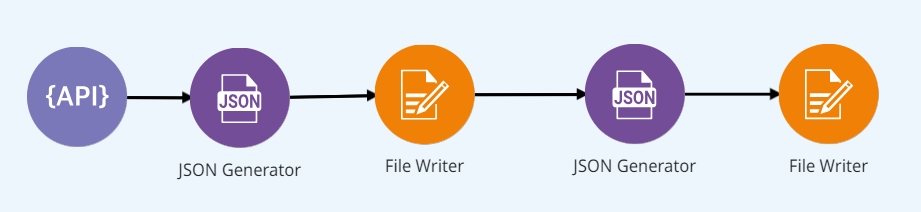
For this example, two File Writer components will be configured, one after the other with the options.
The File Writer component will be configured the following way:
File Name: booklist.txt
Data: {{ message.data }}
Policy For When File Already Exists: Fail
End of Line Policy: Windows
Charset: UTF-8
Binary File: deactivated
Coalesce: deactivated
Fail on Error: deactivated
By the end, the canvas will have the following format:
Input
Output
success: “false” when the operation fails.
message: message about the error.
exception: information about the error.
Was this helpful?