> For the complete documentation index, see [llms.txt](https://docs.digibee.com/documentation/llms.txt). Markdown versions of documentation pages are available by appending `.md` to page URLs; this page is available as [Markdown](https://docs.digibee.com/documentation/developer-guide/development-cycle/build-overview/pipelines/messages-processing.md).
# Messages processing
Understand how the Digibee Integration Platform processes the messages of each component in a flow.
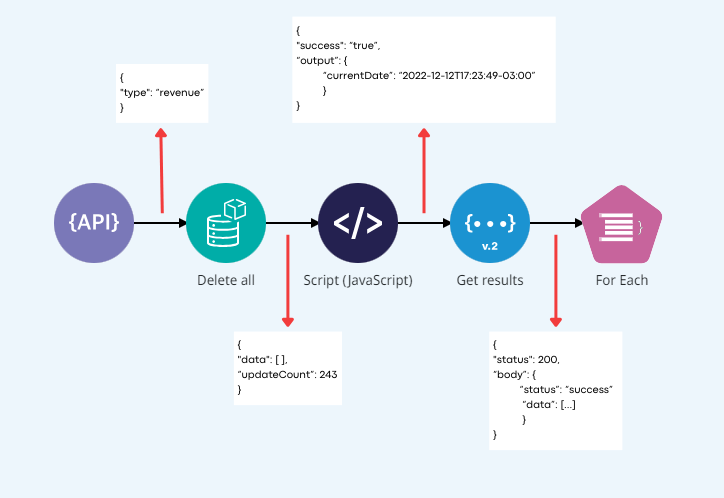
A flow is a sequence of interconnected components that communicate with each other by processing messages. The processing of messages between components occurs in three steps:
* The component receives the message from the previous component (message **in**).
* The component executes some processing that may or may not use the information from the received message.
* The component sends the message to the next component (message **out**).
The messages are always in JSON format.
## Example
A pipeline is built using a [**REST Trigger**](/documentation/connectors-and-triggers/pt-br/triggers/web-protocols/rest.md), which is requested and passes the received parameter (`"type": "revenue"`) to the next component - an [**Object Store**](/documentation/connectors-and-triggers/pt-br/connectors/structured-data/object-store.md) called “Delete all”. One component after another finishes its execution and triggers the next one by delivering the result message of its processing.
If you choose to submit messages in JSON format only, manipulation and transformation are made easier, whether you use transformation components or Double Braces expressions. These expressions must refer to elements of the message **in** to generate messages **out**.
Learn more about [Double Braces](/documentation/connectors-and-triggers/double-braces/overview.md), an expression language developed by Digibee Integration Platform.
---
# Agent Instructions
This documentation is published with GitBook. GitBook is the documentation platform designed so that both humans and AI agents can read, navigate, and reason over technical content effectively. Learn more at gitbook.com.
## Querying This Documentation
If you need additional information that is not directly available in this page, you can query the documentation dynamically by asking a question.
Perform an HTTP GET request on the current page URL with the `ask` query parameter, and the optional `goal` query parameter:
```
GET https://docs.digibee.com/documentation/developer-guide/development-cycle/build-overview/pipelines/messages-processing.md?ask=&goal=
```
`ask` is the immediate question: it should be specific, self-contained, and written in natural language.
`goal` is optional and describes the broader end goal you are ultimately trying to accomplish on behalf of the user. GitBook uses it to tailor the answer towards what is most useful for that goal.
The response will contain a direct answer to the question and relevant excerpts and sources from the documentation.
Use this mechanism when the answer is not explicitly present in the current page, you need clarification or additional context, or you want to retrieve related documentation sections.