> For the complete documentation index, see [llms.txt](https://docs.digibee.com/documentation/llms.txt). Markdown versions of documentation pages are available by appending `.md` to page URLs; this page is available as [Markdown](https://docs.digibee.com/documentation/developer-guide/development-cycle/build-overview/pipelines.md).
# Pipeline
Learn more about the pipeline concept in the Digibee Integration Platform.
The Digibee Integration Platform has the pipeline as the main piece, which is a sequence of components that allow the connection of systems to establish data flow between them.
A pipeline consists of:
* One trigger
* At least one other component
{% hint style="info" %}
The trigger must be connected to the components of the flow.
{% endhint %}
A trigger is the pipeline's activation condition, that is, the element that defines how the pipeline's execution is initiated – for example, by an external call, in response to an event, or through a schedule. To learn more, read the [Triggers documentation](/documentation/connectors-and-triggers/triggers/overview.md).
A component is an element that receives a message and can interact with it or use the information it contains to execute any of the following activities:
* Call external services, such as a [**REST**](/documentation/connectors-and-triggers/pt-br/connectors/web-protocols/rest-v2.md) endpoint.
* Process messages by transforming the content of a message.
* Change the execution flow by branching the pipeline flow based on conditions, like the [**Choice**](/documentation/connectors-and-triggers/connectors/logic/choice.md) component does.
* Loop through collections, as the [**For Each**](/documentation/connectors-and-triggers/connectors/logic/for-each.md) component does.
This last case is a bit more sophisticated and to understand it we need to examine it more closely.
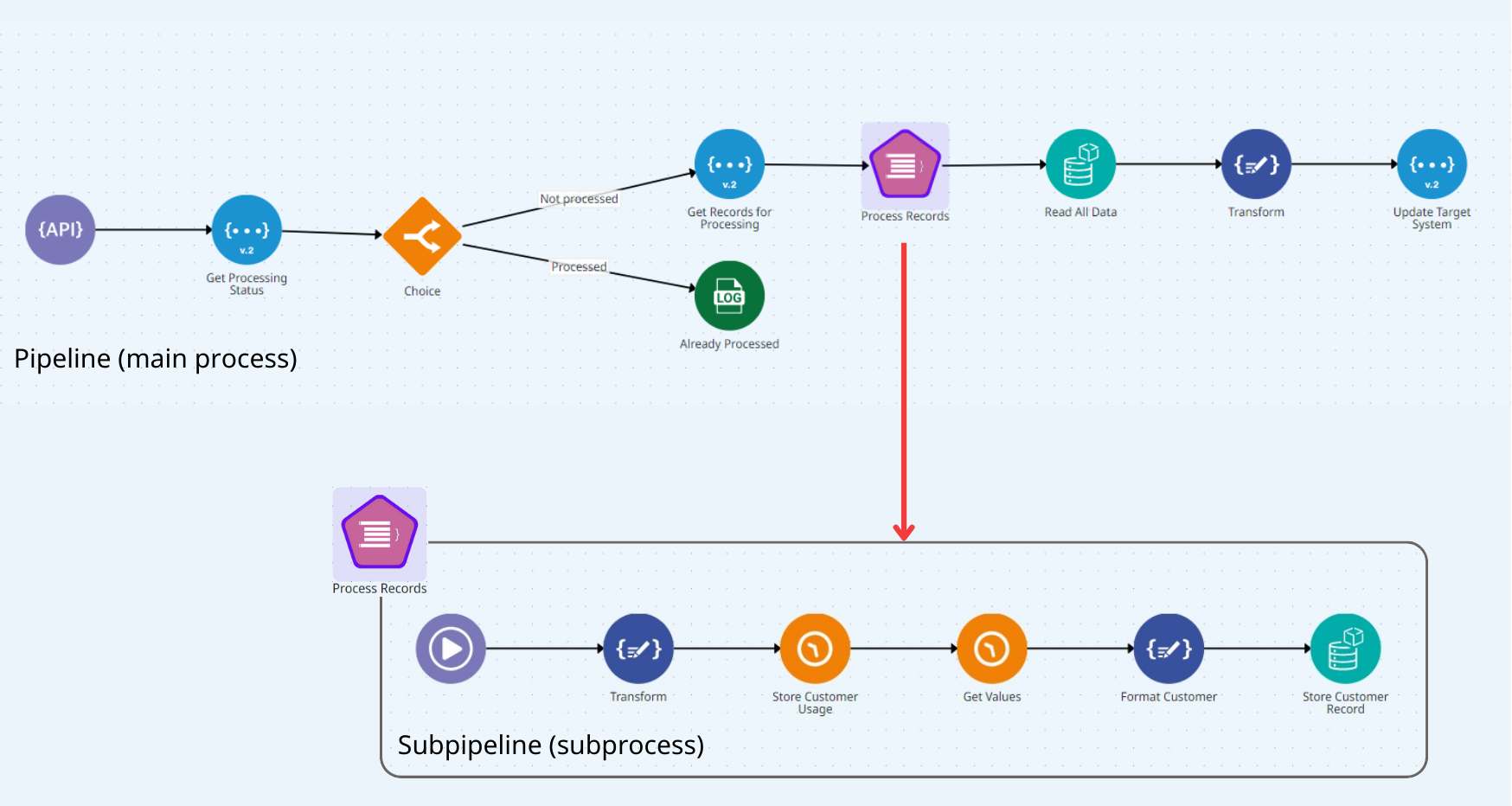
When you use a component that iterates in collections, each collection item is processed in a separate flow called subpipeline. See the image below:
1. The main flow is executed up to the component in which the subpipeline is created (in the example above, this component is **For Each**, which is called “Process Records”).
2. The execution takes place in the subpipeline, where each item of the collection is processed individually.
3. When the execution of item 2 is finished, the control returns to the beginning of the subpipeline, which starts processing the next item, and so it continues until the collection is completely processed.
4. Once the entire collection is processed, the control returns to the **For Each** component, which directs the flow to the next component in the main flow (in this case, the **Object Store** component named “Read All Data”).
To learn more, read the article [Subpipelines](/documentation/developer-guide/development-cycle/build-overview/pipelines/subpipelines.md).
---
# Agent Instructions
This documentation is published with GitBook. GitBook is the documentation platform designed so that both humans and AI agents can read, navigate, and reason over technical content effectively. Learn more at gitbook.com.
## Querying This Documentation
If you need additional information that is not directly available in this page, you can query the documentation dynamically by asking a question.
Perform an HTTP GET request on the current page URL with the `ask` query parameter, and the optional `goal` query parameter:
```
GET https://docs.digibee.com/documentation/developer-guide/development-cycle/build-overview/pipelines.md?ask=&goal=
```
`ask` is the immediate question: it should be specific, self-contained, and written in natural language.
`goal` is optional and describes the broader end goal you are ultimately trying to accomplish on behalf of the user. GitBook uses it to tailor the answer towards what is most useful for that goal.
The response will contain a direct answer to the question and relevant excerpts and sources from the documentation.
Use this mechanism when the answer is not explicitly present in the current page, you need clarification or additional context, or you want to retrieve related documentation sections.