> For the complete documentation index, see [llms.txt](https://docs.digibee.com/documentation/llms.txt). Markdown versions of documentation pages are available by appending `.md` to page URLs; this page is available as [Markdown](https://docs.digibee.com/documentation/troubleshooting/pt-br/connectivity-guides/digibee-sap.md).
# Como conectar a Digibee à SAP
Saiba como estabelecer uma conexão entre a Digibee e a SAP.
## **O que é SAP?**
A SAP é uma plataforma de software voltada para negócios e soluções ERP (*Enterprise Resource Planning*). Ela auxilia na gestão de processos como controle de inventário, processamento de folhas de pagamento, emissão de ordens de compra e faturamento. Para mais detalhes sobre as soluções SAP, acesse o [site oficial](https://www.sap.com/brazil/about/what-is-sap.html).
## **Conectando a SAP com a Digibee**
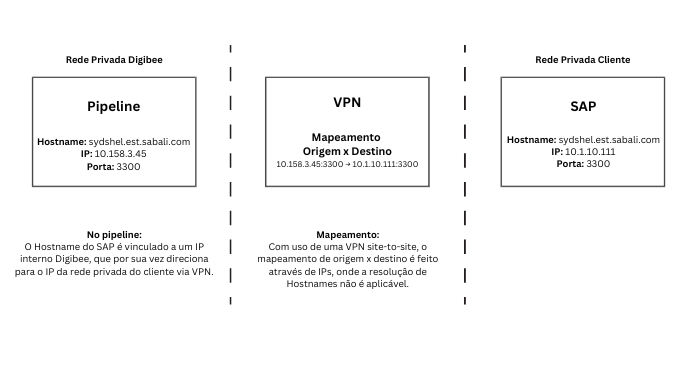
A integração entre a SAP e a Digibee Integration Platform é geralmente realizada por meio de uma Virtual Private Network (VPN). Essa conexão permite que a Digibee se comunique com a rede onde o serviço SAP está localizado.
Após configurar a VPN, será necessário mapear o servidor SAP para que ele fique acessível no pipeline através da VPN.
### **Etapa 1: Mapeamento do servidor SAP**
Para realizar o mapeamento, siga as etapas abaixo:
1. Entre em contato com o [Suporte da Digibee](/documentation/troubleshooting/pt-br/help-and-faq/support.md) para solicitar assistência.
2. Forneça as seguintes informações:
* **Endereço IP** do servidor SAP
* **Porta TCP** utilizada pelo serviço SAP
* **Hostname** da instalação SAP
**Exemplo:**
* **IP:** 10.1.10.111
* **Porta:** 3300
* **Hostname:** sydshel.est.sabali.com
3. Aguarde a confirmação do Suporte da Digibee sobre a conclusão da conexão
Veja abaixo um diagrama que ilustra o processo de conexão:
### **Etapa 2: Teste de conexão**
Para garantir que a conexão foi configurada corretamente, siga os passos abaixo:
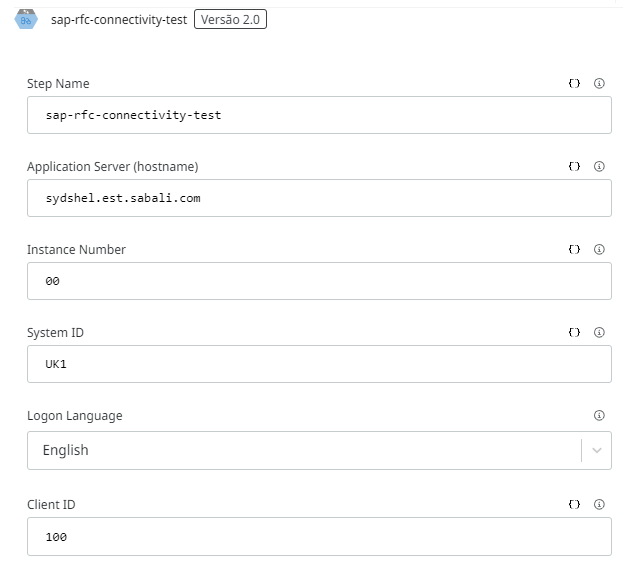
1. No pipeline, adicione a cápsula [**SAP RFC - Connectivity Test**](/documentation/developer-guide/pt-br/development-cycle/build-overview/capsulas/public-capsules/sap.md#sap-rfc-connectivity-test) ao fluxo.
2. Insira o **Hostname** do servidor SAP.
3. Preencha os campos restantes com as informações do servidor SAP, conforme o exemplo:
4. Execute o teste no pipeline para verificar e confirmar a conexão.
---
# Agent Instructions
This documentation is published with GitBook. GitBook is the documentation platform designed so that both humans and AI agents can read, navigate, and reason over technical content effectively. Learn more at gitbook.com.
## Querying This Documentation
If you need additional information that is not directly available in this page, you can query the documentation by asking a question.
Perform an HTTP GET request on the following URL with the `ask` and `goal` query parameters:
```
GET https://docs.digibee.com/documentation/troubleshooting/pt-br/connectivity-guides/digibee-sap.md?ask=&goal=
```
`ask` is the immediate question: it should be specific, self-contained, and written in natural language.
`goal` is what the user is ultimately trying to achieve, the reason they need the answer. Sharing it helps GitBook give you a better, more relevant answer. A goal is most helpful when it describes the outcome the user wants rather than restating the question. For example, with `ask=how do I create an API token`, a goal like `automate deployments from our CI pipeline` lets GitBook tailor the answer to that use case.
The response will contain a direct answer to the question and relevant excerpts and sources from the documentation.
Use this mechanism when the answer is not explicitly present in the current page, you need clarification or additional context, or you want to retrieve related documentation sections.