> For the complete documentation index, see [llms.txt](https://docs.digibee.com/documentation/llms.txt). Markdown versions of documentation pages are available by appending `.md` to page URLs; this page is available as [Markdown](https://docs.digibee.com/documentation/troubleshooting/pt-br/connectivity-guides/digibee-oracle-rac.md).
# Como conectar a Digibee ao Oracle RAC
Saiba como estabelecer uma conexão entre a Digibee e o Oracle RAC usando VPN.
## **O que é Oracle RAC?**
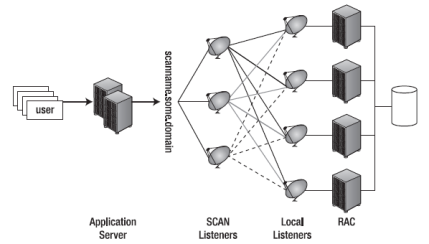
O Oracle RAC (Real Application Cluster) realiza uma escalabilidade transparente tanto para leituras quanto para gravações em diversas cargas de trabalho, como OLTP, análises, vetores de IA, SaaS, JSON, processamento em lote, texto, gráficos, Internet das Coisas (IoT) e processamento em memória. Ele oferece uma série de benefícios para computação em banco de dados, incluindo escalabilidade, alta disponibilidade, balanceamento de carga, redundância e monitoramento. Para mais informações, consulte o [site da Oracle](https://www.oracle.com/br/database/real-application-clusters/).
## **Conectando o Oracle RAC com a Digibee**
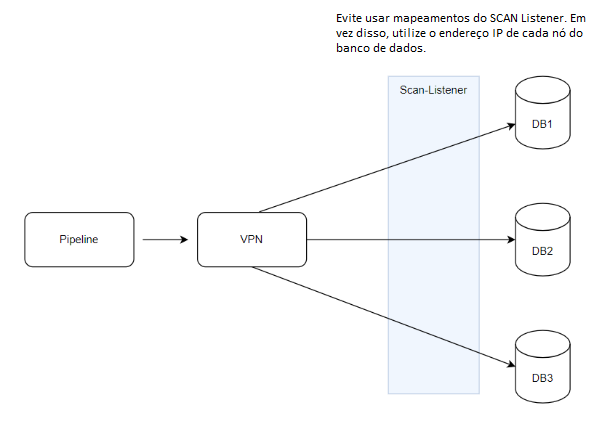
Ao conectar um pipeline a um banco de dados via VPN (Virtual Private Network), a topologia de rede impede a visibilidade dos nós por trás do Oracle SCAN Listener. Como consequência, o driver JDBC não consegue se conectar ao nó indicado pelo listener como disponível para receber a conexão.
Para resolver esse problema:
* Evite utilizar o mapeamento do SCAN Listener.
* Informe ao [Suporte da Digibee](/documentation/troubleshooting/pt-br/help-and-faq/support.md) os IPs de cada nó do banco de dados deste cluster.
* Use uma string de conexão com múltiplos hosts para garantir o tráfego e a redundância entre os nós, o que pode ser configurado por meio da string de conexão.
Veja o exemplo abaixo:
```
jdbc:oracle:thin:@(DESCRIPTION=
(ADDRESS_LIST=
(ADDRESS=(PROTOCOL=TCP)(HOST=10.158.xx.xxx)(PORT=1111))
(ADDRESS=(PROTOCOL=TCP)(HOST=10.158.xx.xxx)(PORT=2222))
(ADDRESS=(PROTOCOL=TCP)(HOST=10.158.xx.xxx)(PORT=3333))
(FAILOVER=on)
(LOAD_BALANCE=on)
)
(CONNECT_DATA=(SERVICE_NAME=SERVICENAME))
)
```
---
# Agent Instructions
This documentation is published with GitBook. GitBook is the documentation platform designed so that both humans and AI agents can read, navigate, and reason over technical content effectively. Learn more at gitbook.com.
## Querying This Documentation
If you need additional information that is not directly available in this page, you can query the documentation by asking a question.
Perform an HTTP GET request on the following URL with the `ask` and `goal` query parameters:
```
GET https://docs.digibee.com/documentation/troubleshooting/pt-br/connectivity-guides/digibee-oracle-rac.md?ask=&goal=
```
`ask` is the immediate question: it should be specific, self-contained, and written in natural language.
`goal` is what the user is ultimately trying to achieve, the reason they need the answer. Sharing it helps GitBook give you a better, more relevant answer. A goal is most helpful when it describes the outcome the user wants rather than restating the question. For example, with `ask=how do I create an API token`, a goal like `automate deployments from our CI pipeline` lets GitBook tailor the answer to that use case.
The response will contain a direct answer to the question and relevant excerpts and sources from the documentation.
Use this mechanism when the answer is not explicitly present in the current page, you need clarification or additional context, or you want to retrieve related documentation sections.