> For the complete documentation index, see [llms.txt](https://docs.digibee.com/documentation/llms.txt). Markdown versions of documentation pages are available by appending `.md` to page URLs; this page is available as [Markdown](https://docs.digibee.com/documentation/release-notes/past-releases/release-notes-2024/october.md).
# October 2024
## Release Notes 10/23/2024
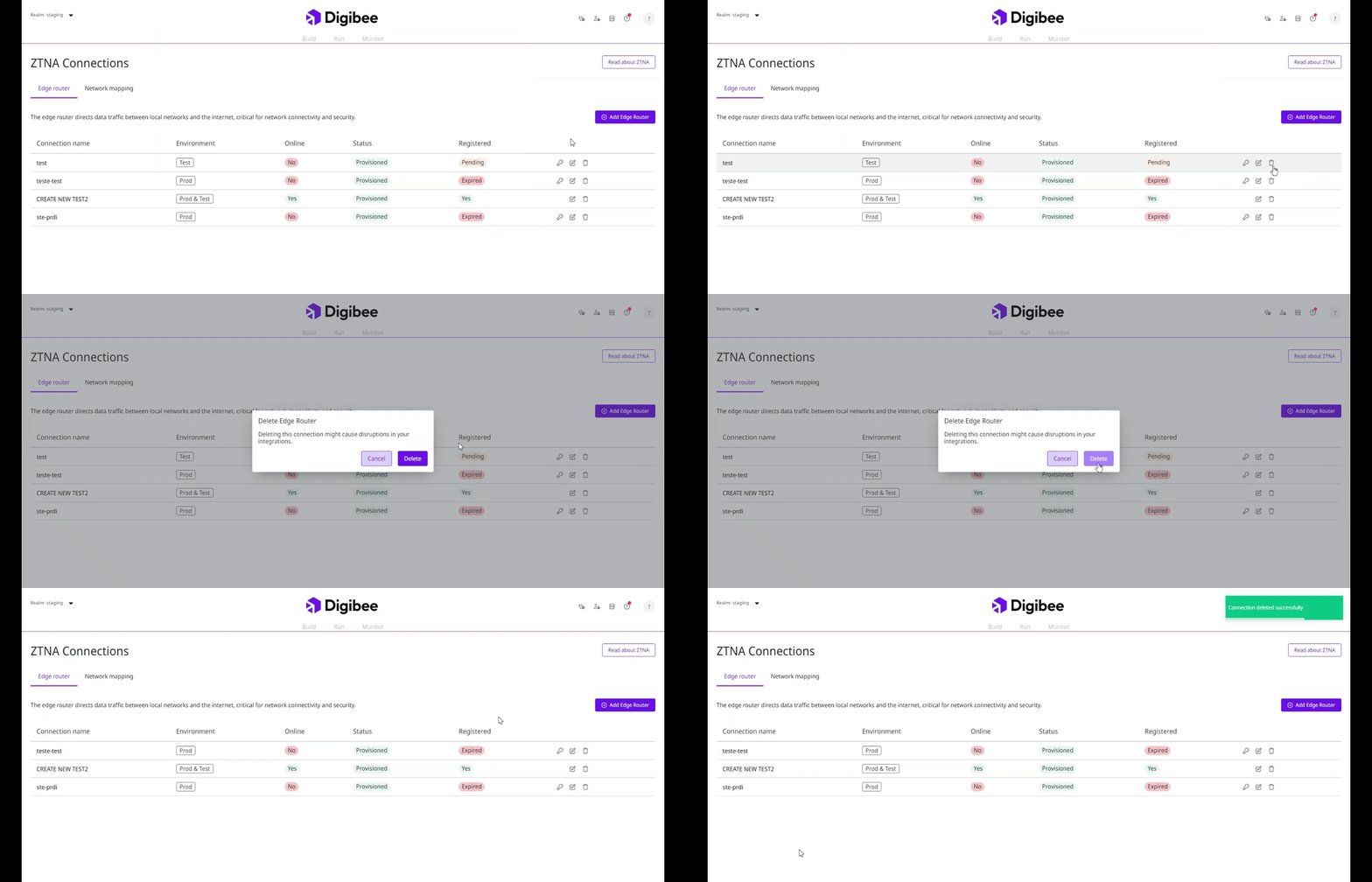
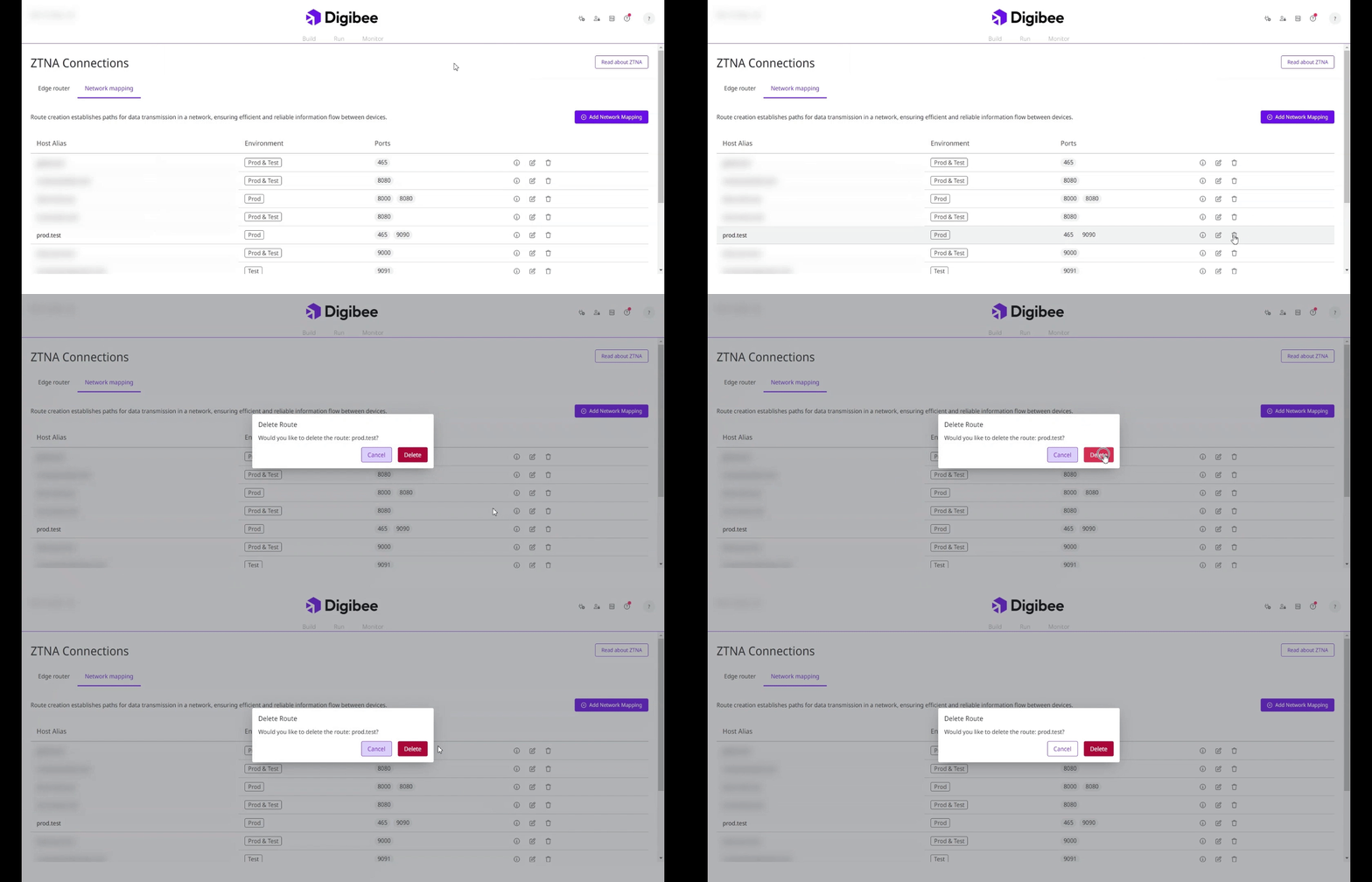
### **New features for ZTNA connections (General Availability)**
We have added two new functions so you can manage your ZTNA connections with greater autonomy:
* [**Delete Connections (Edge Router)**](broken://spaces/jvO5S91EQURCEhbZOuuZ/pages/KpzvK8Qt0M27Pz79IGiS)**:** Remove a connection from your ZTNA connection database.
* [**Delete Routes (Network Mapping)**](broken://spaces/jvO5S91EQURCEhbZOuuZ/pages/zNXVHAALKFOdMxMvaJRJ)**:** Remove a route from your ZTNA connection database.
See the [documentation](/documentation/connectivity-management/ztna.md) for detailed step-by-step guides.
### **Creation of projects and pipelines on Digibeectl (General Availability)**
It is now possible to create projects and pipelines (without a flowSpec) in the Digibee Integration Platform using Digibeectl.
* To create a project, use the **create project** command along with the **--name** (project name) and **--description** (project description) flags.
* To create a pipeline, use the **create pipeline** command along with the **--name** (pipeline name) and **--project** (project name) flags.
Read the [documentation](/documentation/platform-administration/administration/digibeectl/digibeectl-operations.md) to learn more.
### **New roles for users (General Availability)**
Now users can have two new roles:
* **global-environment-manager:** Allows you to define access to view and manage Globals by environment.
* **account-environment-manager:** Allows you to select the environment where users can perform actions related to Accounts.
Read the [documentation](/documentation/platform-administration/administration/new-access-control/access-control-roles.md) to learn more.
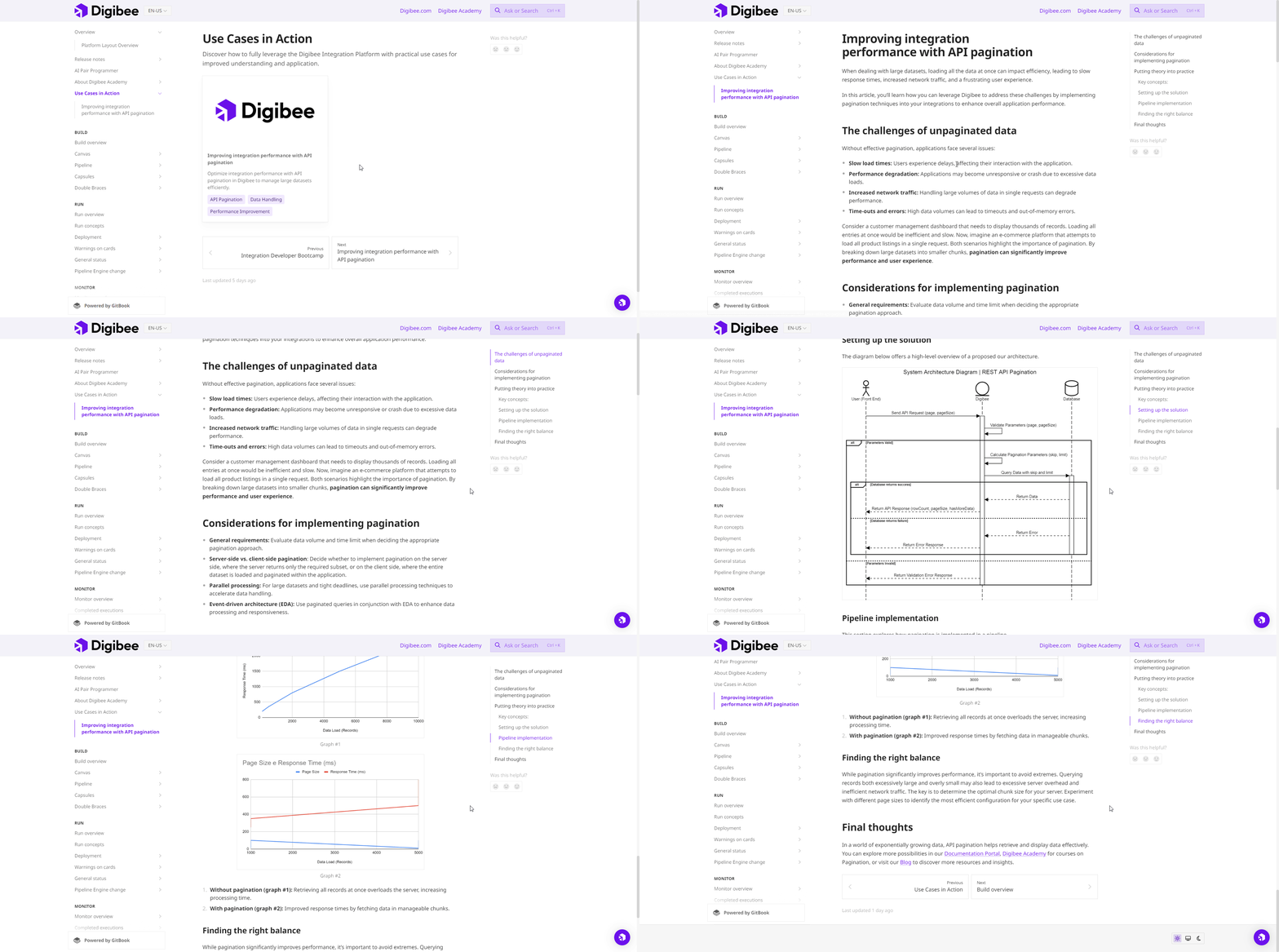
### **Use Cases in Action**
We have added a section for **practical use cases** in the [Documentation Portal](https://docs.digibee.com/documentation/home/). This section provides **real-world examples** that explain pipeline concepts and help you apply integration scenarios.
In the first use case, you will learn **how to improve integration performance with API pagination**, making it easier to manage large data sets.
You can explore the **Use Cases in Action** section anytime through the Documentation Portal:
{% content-ref url="/spaces/aD6wuPRxnEQEsYpePq36/pages/pF3abdwpwLPJ4GAgrZDy" %}
[Use Cases in Action](/documentation/resources/use-cases/how-to-jolt.md)
{% endcontent-ref %}
### **Improvements**
* **Improvements to CPU and Memory usage charts on the** [**Pipeline Metrics page**](/documentation/development-cycle/dashboards/pipeline-metrics.md)**:** The CPU usage and Memory usage charts now display minimum, maximum, and average usage values for both CPU and memory, providing a more detailed view of your pipelines' performance.
* **Connectivity documentation update:** Documents related to connectivity technologies on the Digibee Integration Platform have been updated. Access the [Documentation Portal](/documentation/connectivity-management/connectivity.md) to learn more.
## Release Notes 10/01/2024
### **Pipeline scaffolding from an OpenAPI Specification (General Availability)**
It is now possible to scaffold a pipeline from an OpenAPI specification file. To do so, simply click on **Create**, as usual, and select the **Pipeline with OpenAPI** option. After selecting the file and reviewing the routes, a pre-structured pipeline will be created with each route connected to a [**Block Execution**](/documentation/connectors-and-triggers/connectors/logic/block-execution.md), speeding up the process and simplifying management.
[Learn more in the documentation](broken://spaces/jvO5S91EQURCEhbZOuuZ/pages/l5SdSGArIA8aBfHt3CHm).
### **Triggers**
#### **API Trigger (General Availability)**
The API Trigger is the new version of the REST Trigger, bringing significant improvements. The route table now presents the relationship between **path** and **method** more clearly, making it easier to understand the configurations. Additionally, after saving the configurations, the pipeline is automatically generated in the Canvas, already pre-structured, with each configured route connected to a [**Block Execution**](/documentation/connectors-and-triggers/connectors/logic/block-execution.md) connector.
For more information, [refer to the documentation](/documentation/connectors-and-triggers/triggers/web-protocols/api.md).
#### **Trigger categories (General Availability)**
[Triggers](/documentation/connectors-and-triggers/triggers/overview.md) are now divided into categories and organized alphabetically, making it easier to find the desired trigger in the list. The categories are:
* **Web Protocols**: Triggers used to execute web protocols.
* **Scheduling**: Triggers scheduled to perform actions at a specific time or interval.
* **Messaging and Events**: Triggers activated by messages or events.
* **Others**: Other types of triggers.
### **AI Assistant – Flow Generation, JOLT Generation, and Docs Q\&A (Beta)**
The [AI Assistant](/documentation/development-cycle/build-overview/canvas/ai-assistant.md) is a new AI-powered functionality in the Digibee Integration Platform. It offers three ways to speed up your work:
* **Flow Generation**: With this option, you can request the Assistant to generate a part or the entire flow of a pipeline, inserting it directly into the Canvas.
* **JOLT Generation**: This feature streamlines the transformation of JSON inputs and outputs into a JOLT specification, simplifying the process and reducing the learning curve needed to do it manually.
* **Docs Q\&A**: The Docs Q\&A feature allows you to ask questions about the Platform while building your pipeline. The Assistant uses Digibee’s official documentation, ensuring reliable answers.
### **Monitor insights**
The **Overview** tab in **Monitor** now displays **Insights** tags in the pipeline table, making it easier to identify and investigate execution issues. Clicking on the tags will take you to the **Pipeline metrics** or **Completed executions** pages, with information for the selected pipeline already filtered. For more details, see the [documentation](/documentation/development-cycle/dashboards/monitor-insights.md).
### **Access permissions by environment**
Users with the **API Key Manager,** **Deployment Manager**, and **Pipeline Manager** roles can configure specific permissions for each environment (test or production), ensuring that authorized groups can only perform tasks in the selected environment. Read the updated [List of permissions by service documentation](/documentation/platform-administration/administration/new-access-control/access-control-roles/list-of-permissions-by-service.md) for more information, and check out the [step-by-step guide](/documentation/platform-administration/administration/new-access-control/access-control-groups.md) to learn how to include this parameter.
### **Improvements and bugs**
#### **Improvements**
* **New shortcuts in the Monitor Overview:** easily access the **Completed executions**, **Logs**, **Metrics**, and **Alerts** pages, with data already filtered for the specific pipeline, using the three-dot icon in the table on the **Overview** tab. For more details, see the [documentation](/documentation/development-cycle/dashboards.md).
* **New shortcut to the number of errors in the Monitor Overview:** when clicking on the number of errors for a pipeline in the **Errors** column, a new tab will open showing the **Completed executions** page, with the detailed history of failed executions for the selected pipeline.
* **Usability improvements in Digibeectl**: use the --output or -o flags together with GET commands to display resources in JSON format in Digibeectl.
#### **Bugs**
* **Build – Archived pipelines not appearing in projects:** We fixed the bug that prevented archived pipelines from being displayed in projects, even when the "Archived" filter was applied in the search.
* **Canvas – OnException subflow in For Each:** We fixed the bug that prevented the OnException subflow from being executed in the For Each connector.
* **Canvas – Retry not working in SOAP V3 connector:** We fixed the bug that caused the "retry" function not to work in the SOAP V3 connector.
---
# Agent Instructions
This documentation is published with GitBook. GitBook is the documentation platform designed so that both humans and AI agents can read, navigate, and reason over technical content effectively. Learn more at gitbook.com.
## Querying This Documentation
If you need additional information that is not directly available in this page, you can query the documentation by asking a question.
Perform an HTTP GET request on the following URL with the `ask` and `goal` query parameters:
```
GET https://docs.digibee.com/documentation/release-notes/past-releases/release-notes-2024/october.md?ask=&goal=
```
`ask` is the immediate question: it should be specific, self-contained, and written in natural language.
`goal` is what the user is ultimately trying to achieve, the reason they need the answer. Sharing it helps GitBook give you a better, more relevant answer. A goal is most helpful when it describes the outcome the user wants rather than restating the question. For example, with `ask=how do I create an API token`, a goal like `automate deployments from our CI pipeline` lets GitBook tailor the answer to that use case.
The response will contain a direct answer to the question and relevant excerpts and sources from the documentation.
Use this mechanism when the answer is not explicitly present in the current page, you need clarification or additional context, or you want to retrieve related documentation sections.