> For the complete documentation index, see [llms.txt](https://docs.digibee.com/documentation/llms.txt). Markdown versions of documentation pages are available by appending `.md` to page URLs; this page is available as [Markdown](https://docs.digibee.com/documentation/release-notes/march-2026/march-24.md).
# March 24
## Platform Improvements
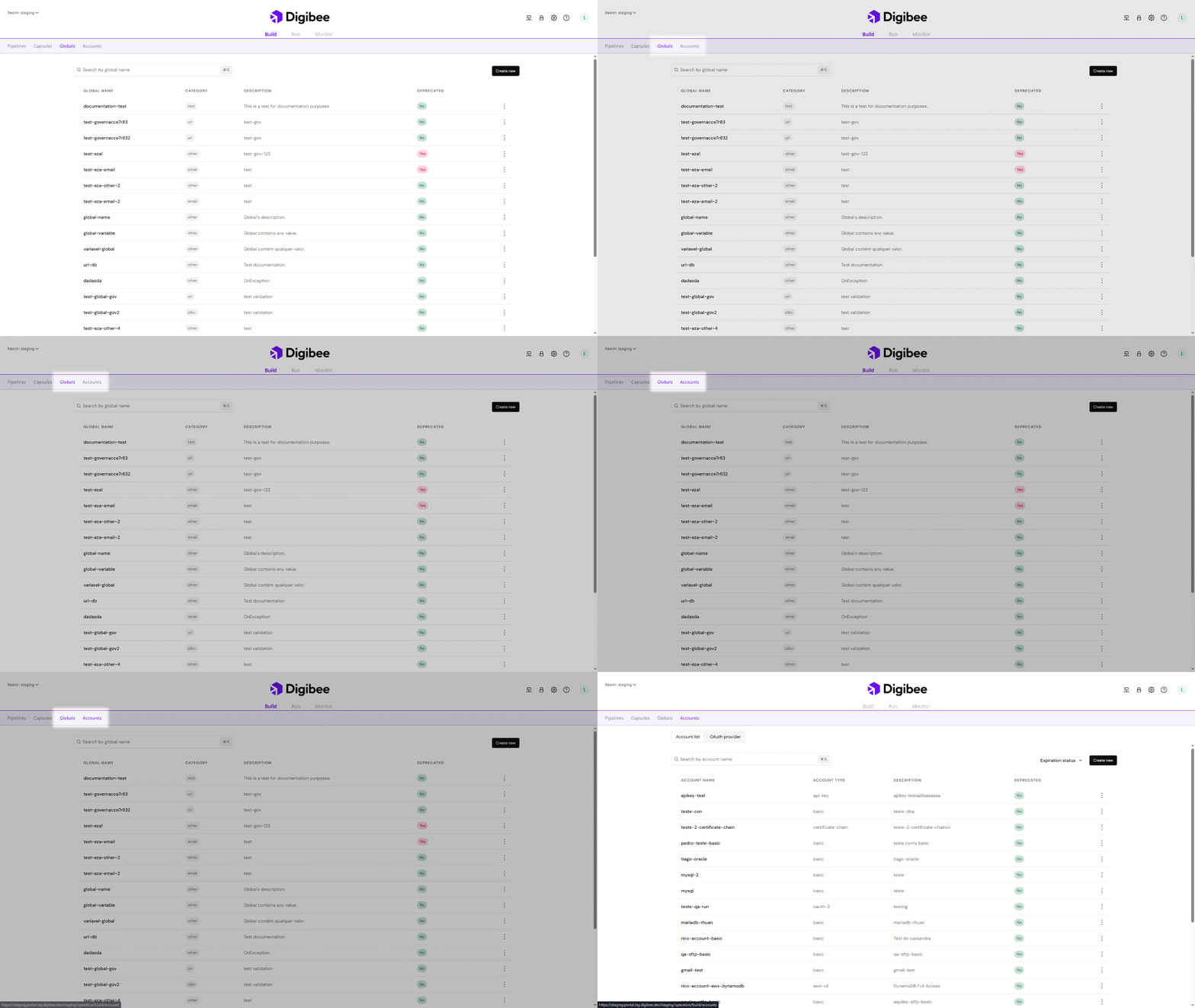
### **New Globals and Accounts tab on the Build page**
Accessing and configuring **Globals** and **Accounts** is easier now. New dedicated tabs are available on the **Build** page, allowing you to create and manage global variables and accounts directly from the area where pipelines are built.
Previously, Globals and Accounts could only be configured through the Settings page. With this update, you no longer need to navigate away from the Build context, making the setup process faster, more intuitive, and better integrated into your workflow.
Learn more
## Connectors
### **New Double Braces function: ISABSENT**
The new `ISABSENT()` function simplifies how you handle missing data in Double Braces expressions. It automatically normalizes null, empty, or non-existent values into a single `null`, eliminating complex workarounds and making your pipelines cleaner, more reliable, and easier to maintain.
See how the function works
### **Blob Storage connector now supports Dynamic Accounts**
The Blob Storage (Azure) connector now supports Dynamic Accounts, allowing credentials to be defined and updated at runtime instead of being statically configured. This makes pipelines more flexible, simplifies credential management, and enables dynamic authentication scenarios, such as temporary tokens or runtime-provided credentials, with greater ease and security.
Read the documentation
## Documentation
Ever wondered how to make sure your AI is actually doing what you expect? We added two new guides that walk you through building an automated quality gate for AI-generated tasks and then making it smart enough for production:
* [**Automate AI task validation with a quality gate**](/documentation/resources/quickstarts/automate-ai-task-validation-with-a-quality-gate.md): Build an Evaluator Agent, test it against mocked data, and see where a strict prompt breaks down.
* [**Optimize the AI auditor with semantic intelligence**](/documentation/resources/quickstarts/optimize-the-ai-auditor-with-semantic-intelligence.md): Fix the prompt using Versioning, make the evaluator semantic, and confirm the improvement with the same test Dataset.
## **Bug fixes**
* **Agent Component fixes:** Fixed an issue where Datasets and Evaluations were not shared across minor versions of the same pipeline, ensuring consistent access to resources throughout the pipeline lifecycle.
* **Output Schema from MCP Tools:** Fixed a bug where the Output Schema was not displayed in the tools/list operation for the MCP Server, ensuring tool schemas are now correctly displayed.
---
# Agent Instructions
This documentation is published with GitBook. GitBook is the documentation platform designed so that both humans and AI agents can read, navigate, and reason over technical content effectively. Learn more at gitbook.com.
## Querying This Documentation
If you need additional information that is not directly available in this page, you can query the documentation by asking a question.
Perform an HTTP GET request on the following URL with the `ask` and `goal` query parameters:
```
GET https://docs.digibee.com/documentation/release-notes/march-2026/march-24.md?ask=&goal=
```
`ask` is the immediate question: it should be specific, self-contained, and written in natural language.
`goal` is what the user is ultimately trying to achieve, the reason they need the answer. Sharing it helps GitBook give you a better, more relevant answer. A goal is most helpful when it describes the outcome the user wants rather than restating the question. For example, with `ask=how do I create an API token`, a goal like `automate deployments from our CI pipeline` lets GitBook tailor the answer to that use case.
The response will contain a direct answer to the question and relevant excerpts and sources from the documentation.
Use this mechanism when the answer is not explicitly present in the current page, you need clarification or additional context, or you want to retrieve related documentation sections.