> For the complete documentation index, see [llms.txt](https://docs.digibee.com/documentation/llms.txt). Markdown versions of documentation pages are available by appending `.md` to page URLs; this page is available as [Markdown](https://docs.digibee.com/documentation/release-notes/march-2026/march-10.md).
# March 10
## Connectors
### **Manual evaluations for test executions in the Agent Component**
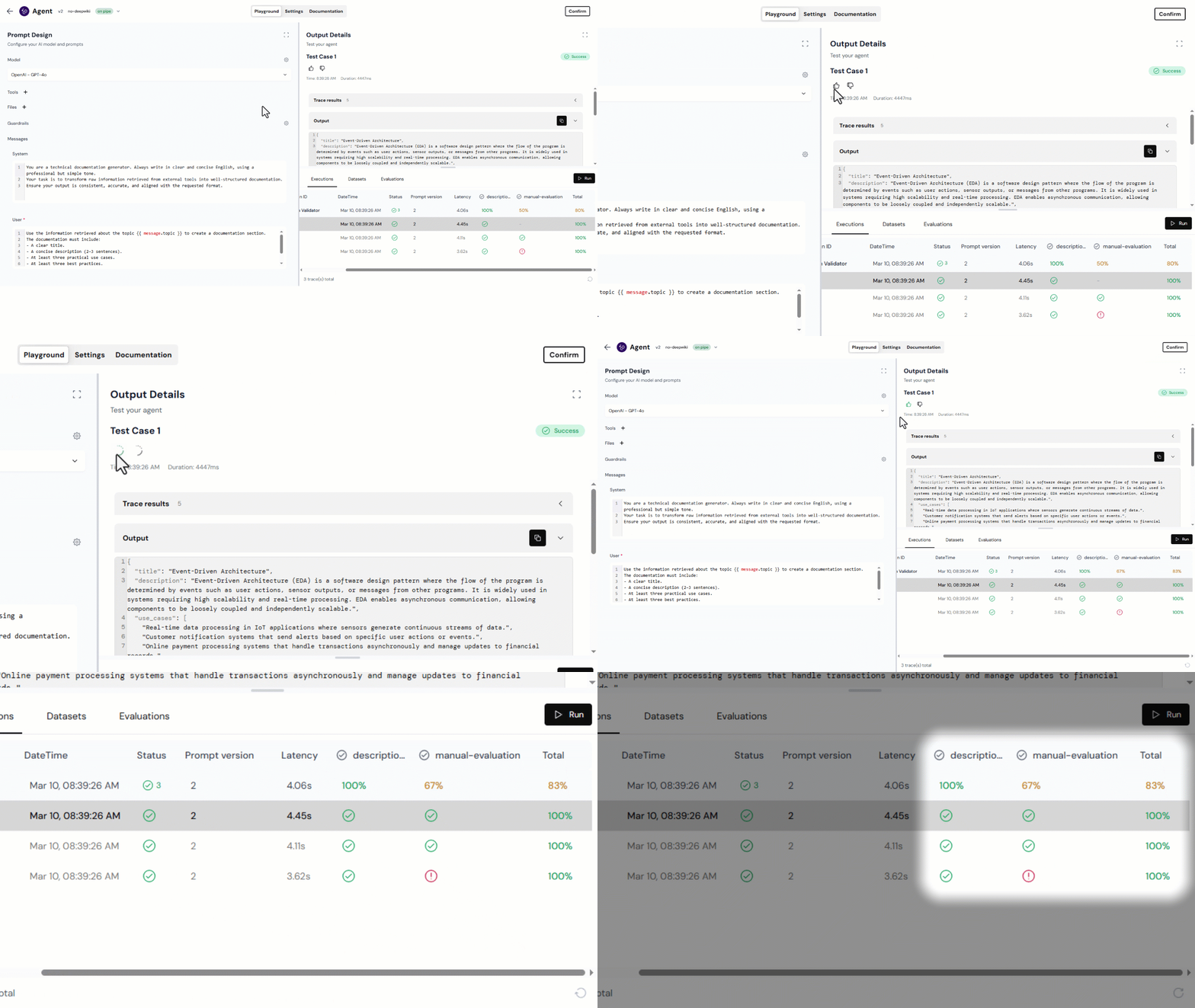
You can now manually evaluate test results when running Datasets in the Agent Component. In each Test Case, rate the result as positive (👍🏼) or negative (👎🏼) based on your assessment.
Your rating adds a **manual-evaluations** column to the execution details in the **Executions** tab and contributes to a manual success rate for the Dataset. This value is combined with Code Scorers results to provide a more complete view of the Dataset’s overall performance.
Learn more
### **Add MCP tools from the registry to the Agent Component**
You can now add MCP pipelines deployed with the [**MCP Server Trigger**](/documentation/connectors-and-triggers/triggers/web-protocols/mcp-server.md) directly from the **MCP From Registry** tab when configuring tools in the Agent Component.
Previously, it was necessary to manually copy the endpoint information from the **Run** page to configure an MCP tool. With this update, the process is simplified.
The **MCP From Registry** tab lists available pipelines deployed in **Test** or **Prod**, including their authentication type, configured tools, parameters, and version. When selecting a pipeline, key fields such as **Name** and **Server URL** are automatically pre-filled, making MCP Tool configuration faster and easier.
Read the documentation
### Choice and For Each connectors now support Double Braces
Now both [Choice](/documentation/connectors-and-triggers/connectors/logic/choice.md) and [For Each](/documentation/connectors-and-triggers/connectors/logic/for-each.md) connectors support [Double Braces expressions](/documentation/connectors-and-triggers/double-braces/overview.md), eliminating the need for temporary variables and allowing the use of previous step data with ease.
In For Each, in addition to supporting Double Braces in the iteration expression, a new reserved reference was introduced to access the current element of the loop:
`{{iterators..current}}`
This reference ensures consistent access to the element being processed, even when connectors inside the iteration modify the payload.
These improvements increase expression syntax consistency across connectors, reduce implementation errors, and make automation flows more predictable and reliable.
## Documentation
We’ve created the following use case documentation to help you expand your knowledge of AI on the Digibee Integration Platform:
* [**Build secure and controlled AI Agents with Guardrails**](/documentation/resources/quickstarts/agent-guardrails.md)**:** Learn how to ensure data privacy by masking sensitive information and enforcing strict response rules.
We’ve also updated the following documentation to provide more relevant guidance for your learning journey:
* [**Build your first AI testing workflow with Datasets, Evaluations, and Versioning**](/documentation/resources/quickstarts/first-ai-testing-workflow.md)**:** Learn how to create an AI testing workflow that validates structured JSON outputs across multiple input variations.
## **Bug fixes**
* **Undo/Redo fixes on Canvas:** We improved the undo and redo behavior on the Canvas. These options are now disabled when the Execution Panel or the Test Cases configuration is open to avoid unexpected actions.
* **Error when creating a minor version:** We fixed a bug that prevented users from creating new minor versions directly from the Pipeline History.
* **Long input/output in the Results tab from the Execution Panel:** We fixed a bug that prevented users from viewing the full input or output in the Results tab of the Execution Panel when the content was too long after clicking “Open Execution” for a Test Case.
---
# Agent Instructions
This documentation is published with GitBook. GitBook is the documentation platform designed so that both humans and AI agents can read, navigate, and reason over technical content effectively. Learn more at gitbook.com.
## Querying This Documentation
If you need additional information that is not directly available in this page, you can query the documentation by asking a question.
Perform an HTTP GET request on the following URL with the `ask` and `goal` query parameters:
```
GET https://docs.digibee.com/documentation/release-notes/march-2026/march-10.md?ask=&goal=
```
`ask` is the immediate question: it should be specific, self-contained, and written in natural language.
`goal` is what the user is ultimately trying to achieve, the reason they need the answer. Sharing it helps GitBook give you a better, more relevant answer. A goal is most helpful when it describes the outcome the user wants rather than restating the question. For example, with `ask=how do I create an API token`, a goal like `automate deployments from our CI pipeline` lets GitBook tailor the answer to that use case.
The response will contain a direct answer to the question and relevant excerpts and sources from the documentation.
Use this mechanism when the answer is not explicitly present in the current page, you need clarification or additional context, or you want to retrieve related documentation sections.