> For the complete documentation index, see [llms.txt](https://docs.digibee.com/documentation/llms.txt). Markdown versions of documentation pages are available by appending `.md` to page URLs; this page is available as [Markdown](https://docs.digibee.com/documentation/release-notes/february-2026/february-24.md).
# February 24
## Connectors & Triggers
### **Evaluations for Agent Testing**
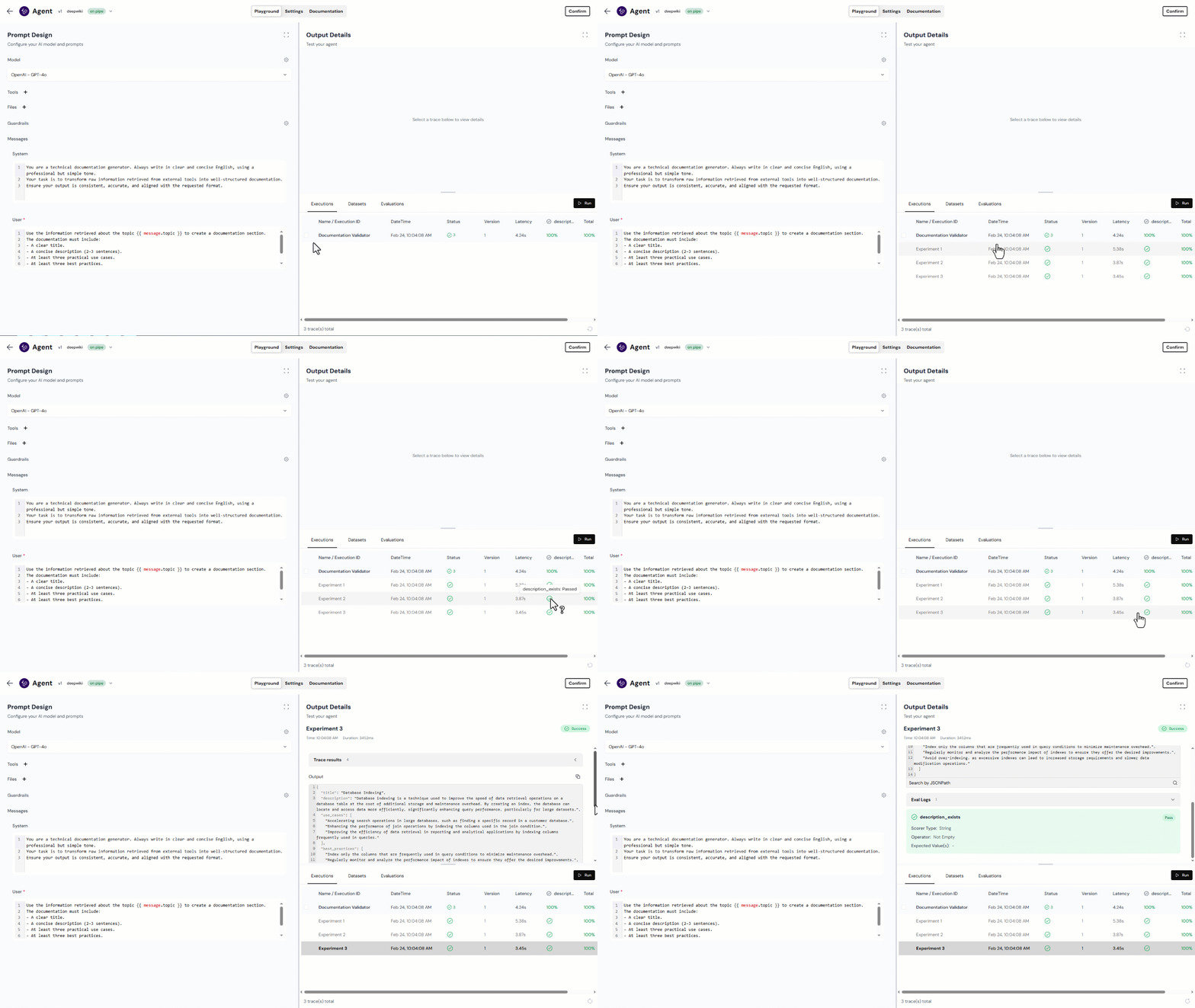
We’ve introduced **Evaluations** in the Agent Component to enable automated validation of model outputs.
Evaluations allow you to define structured validation rules using JSONPath expressions and configurable comparison logic (such as **Not Empty**, **Contains**, or **Equals**). These rules are executed against each Experiment within a Dataset and return clear pass/fail results.
With Evaluations, you can now:
* Automatically verify field presence and data types
* Enforce deterministic value rules
* Detect structural regressions before deployment
* Validate outputs across multiple input variations
This enhancement adds an objective validation layer to AI workflows, improving reliability and reducing manual inspection.
Learn more
### Update to the MCP Server Trigger response format
In the previous release, the [MCP Server Trigger](/documentation/connectors-and-triggers/triggers/web-protocols/mcp-server.md) response format was updated to align with the official MCP protocol specification for **text outputs**, encapsulating responses inside the `content` field.
With this release, we extended the implementation to support structured outputs that are now properly returned in the `structuredContent` field, as defined by the MCP protocol.
This improvement ensures full compliance with the tool/call response specification and guarantees consistent handling of both textual and structured data across MCP-compatible integrations.
## Platform Improvements
### **Undo and Redo on Canvas**
Boost your workflow efficiency and edit with confidence. You can now quickly reverse or reapply actions within the Canvas — such as adding/removing connectors or updating configurations — using the new **Undo** and **Redo** buttons. Located in the lower-right corner, these controls are also accessible via keyboard shortcuts for Windows, Linux, and MacOS.
* **Undo:** Ctrl + Z (Windows/Linux) or Cmd + Z (macOS).
* **Redo:** Ctrl + Shift + Z (Windows/Linux) or Cmd + Shift + Z (macOS).
Check it out
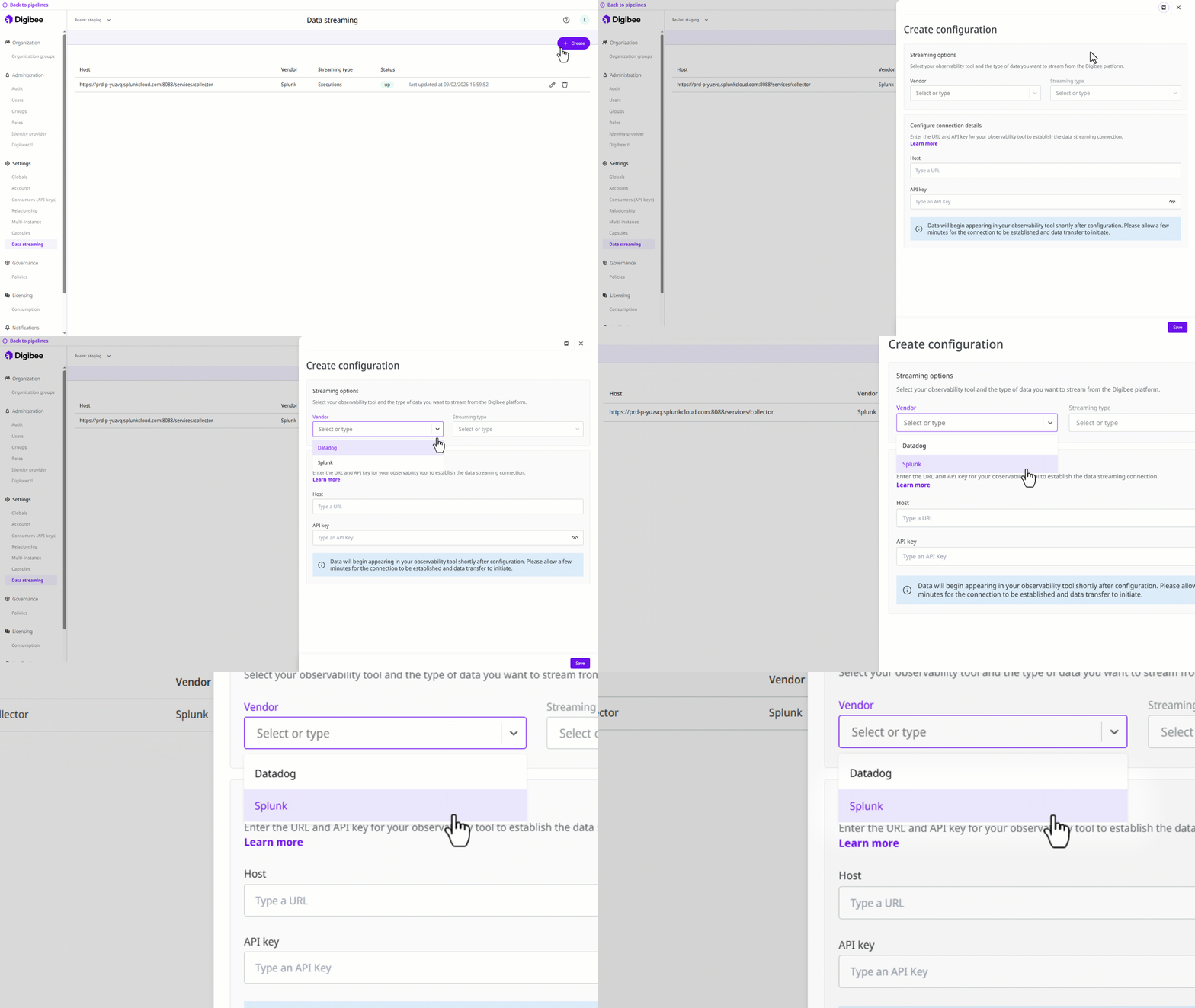
### **Data Streaming now available for Splunk**
Data Streaming on the Digibee Integration Platform now supports Splunk. You can automatically stream logs and execution data to one of the world’s most powerful data analysis platforms in real time.
Read the full documentation
## Documentation
We’ve created the following use case documentation to expand your knowledge of AI on the Digibee Integration Platform:
* [**Build your first AI testing workflow with Datasets and Evaluations**](/documentation/resources/quickstarts/first-ai-testing-workflow.md): Build a working AI testing workflow that validates structured JSON outputs across multiple input variations.
## **Bug fixes**
* **“View more logs" button doesn’t work:** We fixed a bug that prevented users from viewing the full list of logs in the detailed Executions tab of the Executions page.
---
# Agent Instructions
This documentation is published with GitBook. GitBook is the documentation platform designed so that both humans and AI agents can read, navigate, and reason over technical content effectively. Learn more at gitbook.com.
## Querying This Documentation
If you need additional information that is not directly available in this page, you can query the documentation by asking a question.
Perform an HTTP GET request on the following URL with the `ask` and `goal` query parameters:
```
GET https://docs.digibee.com/documentation/release-notes/february-2026/february-24.md?ask=&goal=
```
`ask` is the immediate question: it should be specific, self-contained, and written in natural language.
`goal` is what the user is ultimately trying to achieve, the reason they need the answer. Sharing it helps GitBook give you a better, more relevant answer. A goal is most helpful when it describes the outcome the user wants rather than restating the question. For example, with `ask=how do I create an API token`, a goal like `automate deployments from our CI pipeline` lets GitBook tailor the answer to that use case.
The response will contain a direct answer to the question and relevant excerpts and sources from the documentation.
Use this mechanism when the answer is not explicitly present in the current page, you need clarification or additional context, or you want to retrieve related documentation sections.
.gif?alt=media&token=18a7a06c-0a75-400f-a8c5-ec9978d6710a)