> For the complete documentation index, see [llms.txt](https://docs.digibee.com/documentation/llms.txt). Markdown versions of documentation pages are available by appending `.md` to page URLs; this page is available as [Markdown](https://docs.digibee.com/documentation/developer-guide/pt-br/development-cycle/overview/deployment/pipeline-deployment-status.md).
# Status de implantação do pipeline
Conheça os diferentes status de implantação de um pipeline.
Quando um *pipeline* é executado, é possível obter informações de data e hora da implantação, seu funcionamento e outros dados em tempo real. Confira a seguir os status e as informações.
## Intervalo de auto refresh
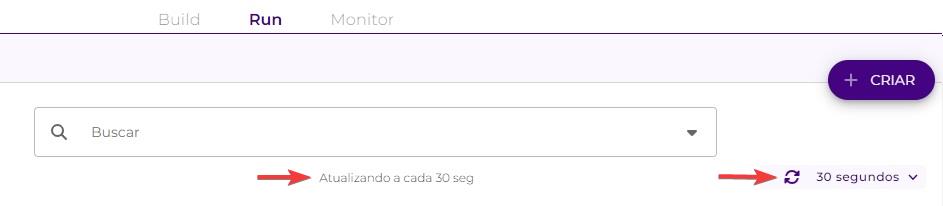
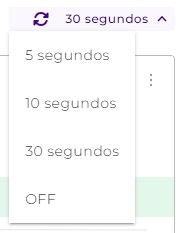
Selecione no menu de contagem abaixo da barra de busca o intervalo de tempo para as atualizações na página de Run.
O intervalo padrão é de 05 segundos. Você pode escolher entre quatro opções de tempo: 5 segundos, 10 segundos, 30 segundos e OFF, para desativar as atualizações.
## Informações em tempo real
Acompanhe os status de um *pipeline* durante sua implantação em tempo real. Com essas informações você pode gerenciar o tempo e planejar a próxima implantação de seus *pipelines.*
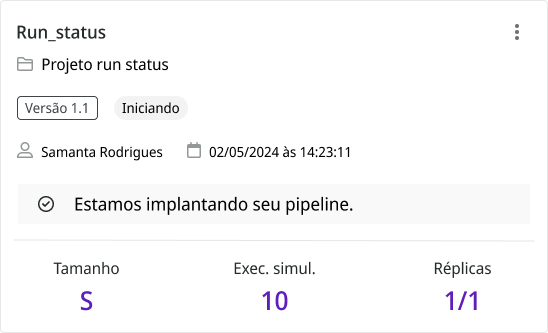
### Status: Iniciando
O status **Iniciando** acontece no começo da implantação e informa que o *pipeline* está pronto para ser implantado.
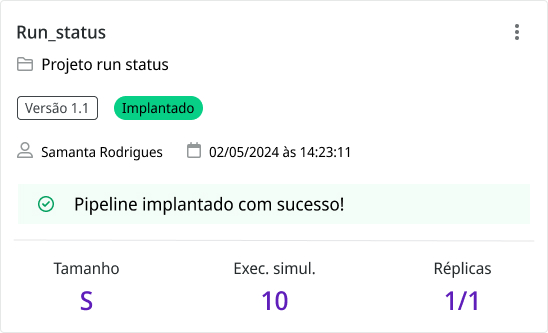
### Status: Implantado
O status **Implantado** demonstra que a implantação do *pipeline* foi concluída.
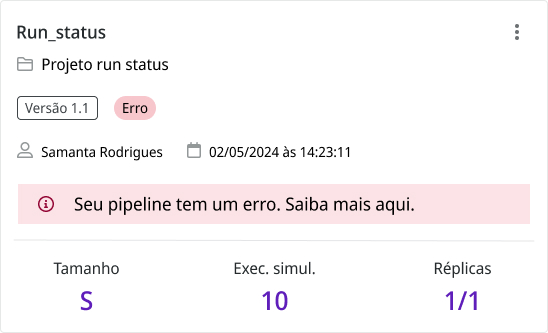
### Status: Erro
O status de **Erro** indica que a implantação foi interrompida por uma falha. Por exemplo, pode ser um erro na etapa de **Build** ou uma seleção de **Tamanho** que não tem suporte porque o *pipeline* é muito grande.
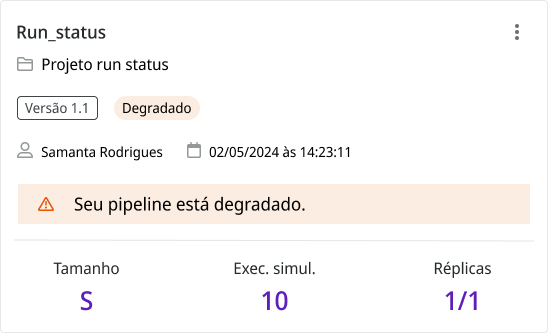
### Status: Degradado
O status **Degradado** mostra que a implantação foi executada mas não foi concluída pois as réplicas não aconteceram durante o tempo limite de 10 minutos. Você precisa realizar uma nova ação de implantação.
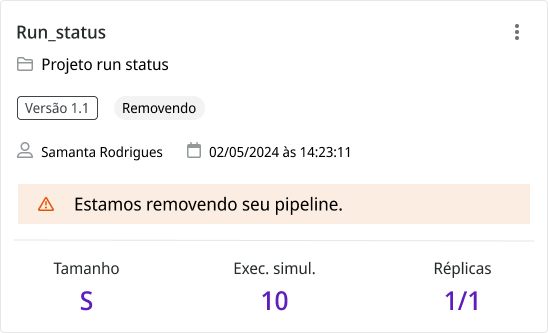
### Status: Removendo
Clique nos três pontos à direita para abrir um submenu com três opções: **Remover implantação**, **Exibir pipeline** e **Reimplantar**.
Ao escolher **Remover implantação,** você pode excluir a implantação realizada. Esta ação exclui apenas a implantação com a versão selecionada, deixando as outras versões inalteradas.
O status **Removendo** ficará visível enquanto a implantação é excluída.
---
# Agent Instructions
This documentation is published with GitBook. GitBook is the documentation platform designed so that both humans and AI agents can read, navigate, and reason over technical content effectively. Learn more at gitbook.com.
## Querying This Documentation
If you need additional information that is not directly available in this page, you can query the documentation by asking a question.
Perform an HTTP GET request on the following URL with the `ask` and `goal` query parameters:
```
GET https://docs.digibee.com/documentation/developer-guide/pt-br/development-cycle/overview/deployment/pipeline-deployment-status.md?ask=&goal=
```
`ask` is the immediate question: it should be specific, self-contained, and written in natural language.
`goal` is what the user is ultimately trying to achieve, the reason they need the answer. Sharing it helps GitBook give you a better, more relevant answer. A goal is most helpful when it describes the outcome the user wants rather than restating the question. For example, with `ask=how do I create an API token`, a goal like `automate deployments from our CI pipeline` lets GitBook tailor the answer to that use case.
The response will contain a direct answer to the question and relevant excerpts and sources from the documentation.
Use this mechanism when the answer is not explicitly present in the current page, you need clarification or additional context, or you want to retrieve related documentation sections.