> For the complete documentation index, see [llms.txt](https://docs.digibee.com/documentation/llms.txt). Markdown versions of documentation pages are available by appending `.md` to page URLs; this page is available as [Markdown](https://docs.digibee.com/documentation/developer-guide/pt-br/development-cycle/build-overview/pipelines/messages-processing.md).
# Processamento de mensagens
Entenda como a Digibee Integration Platform processa as mensagens de cada componente em um fluxo.
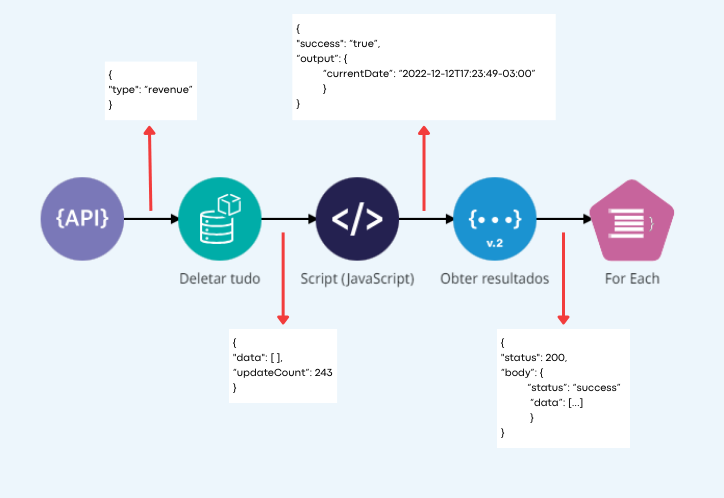
Um fluxo é uma sequência de componentes interconectados que se comunicam entre si por meio do processamento de mensagens. O processamento de mensagens entre componentes ocorre em três etapas:
* O componente recebe a mensagem do componente anterior (mensagem de **entrada**).
* O componente executa algum processamento, que pode ou não utilizar as informações da mensagem recebida.
* O componente envia a mensagem para o próximo componente (mensagem de **saída**).
As mensagens estão sempre no formato JSON.
## Exemplo
Um *pipeline* é construído usando um [**REST Trigger**](/documentation/connectors-and-triggers/pt-br/triggers/web-protocols/rest.md), que é solicitado e passa o parâmetro recebido (`"type": "revenue"`) para o próximo componente - um [**Object Store**](/documentation/connectors-and-triggers/pt-br/connectors/structured-data/object-store.md) chamado “Deletar tudo”. Um componente após o outro finaliza sua execução e aciona o próximo entregando a mensagem resultante do seu processamento.
Se você optar por enviar mensagens apenas no formato JSON, a manipulação e a transformação serão facilitadas, independentemente de você usar componentes de transformação ou expressões de *Double Braces*. Estas expressões devem fazer referência a elementos da mensagem de entrada para produzir mensagens de saída.
Aprenda mais sobre [Double Braces](/documentation/connectors-and-triggers/pt-br/double-braces/overview.md), uma linguagem de expressão desenvolvida pela Digibee Integration Platform.
---
# Agent Instructions
This documentation is published with GitBook. GitBook is the documentation platform designed so that both humans and AI agents can read, navigate, and reason over technical content effectively. Learn more at gitbook.com.
## Querying This Documentation
If you need additional information that is not directly available in this page, you can query the documentation by asking a question.
Perform an HTTP GET request on the following URL with the `ask` and `goal` query parameters:
```
GET https://docs.digibee.com/documentation/developer-guide/pt-br/development-cycle/build-overview/pipelines/messages-processing.md?ask=&goal=
```
`ask` is the immediate question: it should be specific, self-contained, and written in natural language.
`goal` is what the user is ultimately trying to achieve, the reason they need the answer. Sharing it helps GitBook give you a better, more relevant answer. A goal is most helpful when it describes the outcome the user wants rather than restating the question. For example, with `ask=how do I create an API token`, a goal like `automate deployments from our CI pipeline` lets GitBook tailor the answer to that use case.
The response will contain a direct answer to the question and relevant excerpts and sources from the documentation.
Use this mechanism when the answer is not explicitly present in the current page, you need clarification or additional context, or you want to retrieve related documentation sections.