> For the complete documentation index, see [llms.txt](https://docs.digibee.com/documentation/llms.txt). Markdown versions of documentation pages are available by appending `.md` to page URLs; this page is available as [Markdown](https://docs.digibee.com/documentation/platform-administration/governance/policies/transformation/custom-http-header.md).
# Custom HTTP header
Learn more about how the Custom HTTP header policy works on the Digibee Integration Platform.
HTTP headers are a key-value pair that provides important information about the request or response, such as the type of content sent, the method used, the authentication data, and more.
In the Digibee Integration Platform, the Custom HTTP header policy allows you to specify custom headers that are not defined by the HTTP standard and are returned when a request is made to the pipeline trigger endpoint. This endpoint is available in the details of the deployed pipeline in Run. In this way, each time the pipeline receives a request, the response will contain the headers specified in the policy.
By adding custom headers, you can include additional metadata or instructions that are specific to the requirements of your integration. You can also define different key-value pairs for headers for production and other environments.
## How to configure a Custom HTTP header policy
Follow these steps to configure a Custom HTTP header policy:
1. On the Platform home page, click **Administration** in the upper right corner.
2. Click **Policies**.
3. Click the **Transformation** tab.
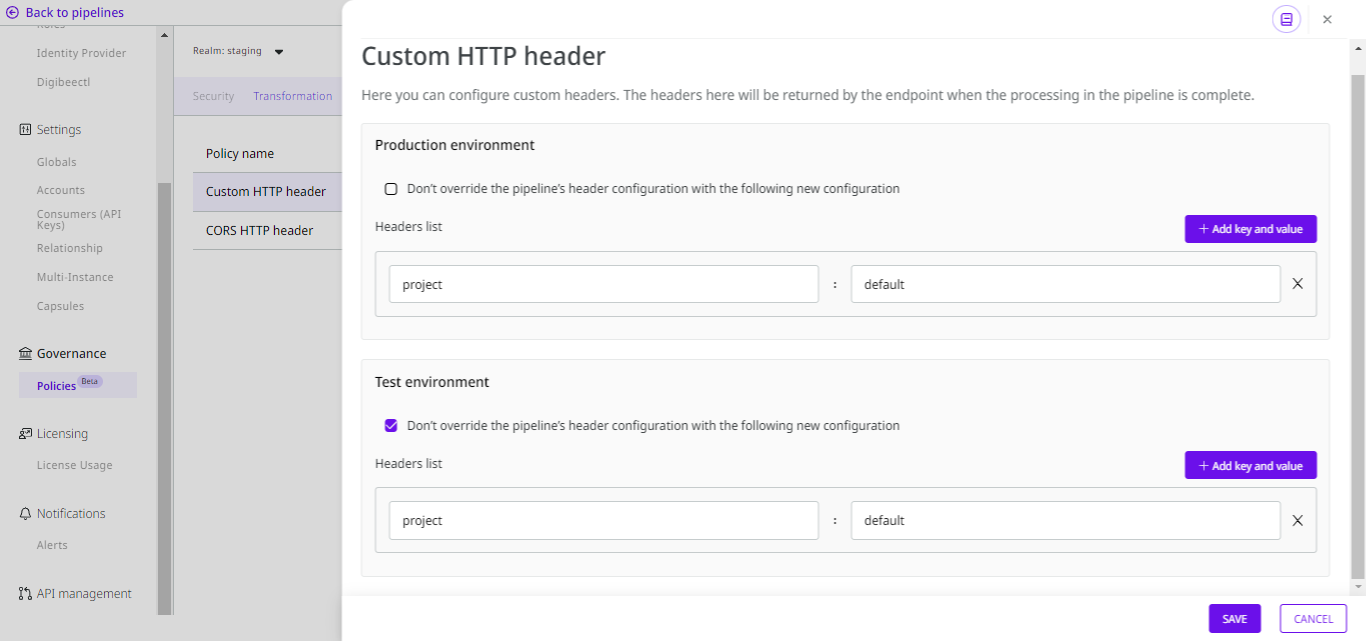
4. Open the **Custom HTTP header** policy. You will see a different configuration for each environment.
5. Activate the **Don’t override the pipeline’s header configuration with the following new configuration** option if you don’t want to override the values of the headers configured in the pipelines with the values of the policy’s headers. If you keep this option deactivated, the values will be overridden.
{% hint style="warning" %}
The headers are only overridden if they have the same key in both the policy and the pipeline. If they don’t have the same key, the headers from the pipeline and the policy are added together in the response.
{% endhint %}
6. Click **Add key and value** to add a new key-value pair of information. Enter the data in the corresponding **key** and **value** fields.
7. You can delete any key-value pair by clicking the **X** icon.
{% hint style="info" %}
It may take a few minutes for the headers to be applied to all pipelines.
{% endhint %}
You can edit the policy at any time by following the steps described above or view the configuration in read-only mode by clicking the **eye** icon.
{% embed url="" %}
### Use case: overriding the pipeline’s header configuration with the policy configuration
#### Situation 1: you don’t want to override the pipeline’s header configuration
Suppose you want all your pipelines to show their project in the response headers, and if the project is not set in the header of the pipelines, it should show `project: default`.
In this case, this should be the policy configuration:
* **Don’t override the pipeline’s header configuration with the following new configuration** option activated.
* **Key-value pair:** `project: default`.
This means that the values configured in the individual pipelines will override the values defined in the policy. So if you create a pipeline and add the key-value pair `project: digibee`, the header of the pipeline will take precedence over the header configured in the policy. However, if you don’t add a header that contains the key `project` to your pipeline, the `project: default` header will be returned in the response instead.
#### Situation 2: you want to override the pipeline’s header configuration
Now let’s assume that you always want to display the `project: default` header in the response, regardless if the header `project: digibee` is configured in the pipeline.
In this case, this should be the policy configuration:
* **Don’t override the pipeline’s header configuration with the following new configuration** option deactivated.
* **Key-value pair:** `project: default`.
This means that regardless of whether the pipeline configuration contains the `project` key with a specific value, the header `project: default` configured in the policy will be displayed in the request response instead.
---
# Agent Instructions
This documentation is published with GitBook. GitBook is the documentation platform designed so that both humans and AI agents can read, navigate, and reason over technical content effectively. Learn more at gitbook.com.
## Querying This Documentation
If you need additional information that is not directly available in this page, you can query the documentation dynamically by asking a question.
Perform an HTTP GET request on the current page URL with the `ask` query parameter, and the optional `goal` query parameter:
```
GET https://docs.digibee.com/documentation/platform-administration/governance/policies/transformation/custom-http-header.md?ask=&goal=
```
`ask` is the immediate question: it should be specific, self-contained, and written in natural language.
`goal` is optional and describes the broader end goal you are ultimately trying to accomplish on behalf of the user. GitBook uses it to tailor the answer towards what is most useful for that goal.
The response will contain a direct answer to the question and relevant excerpts and sources from the documentation.
Use this mechanism when the answer is not explicitly present in the current page, you need clarification or additional context, or you want to retrieve related documentation sections.