> For the complete documentation index, see [llms.txt](https://docs.digibee.com/documentation/llms.txt). Markdown versions of documentation pages are available by appending `.md` to page URLs; this page is available as [Markdown](https://docs.digibee.com/documentation/developer-guide/platform-administration/governance/policies/security/sensitive-fields.md).
# Sensitive fields policy
Learn more about how the sensitive fields policy works on the Digibee Integration Platform.
Sensitive fields can be defined when creating an integration. These fields usually contain sensitive information, such as personal identification or financial data, which should not be disclosed during the integration as they could lead to security breaches.
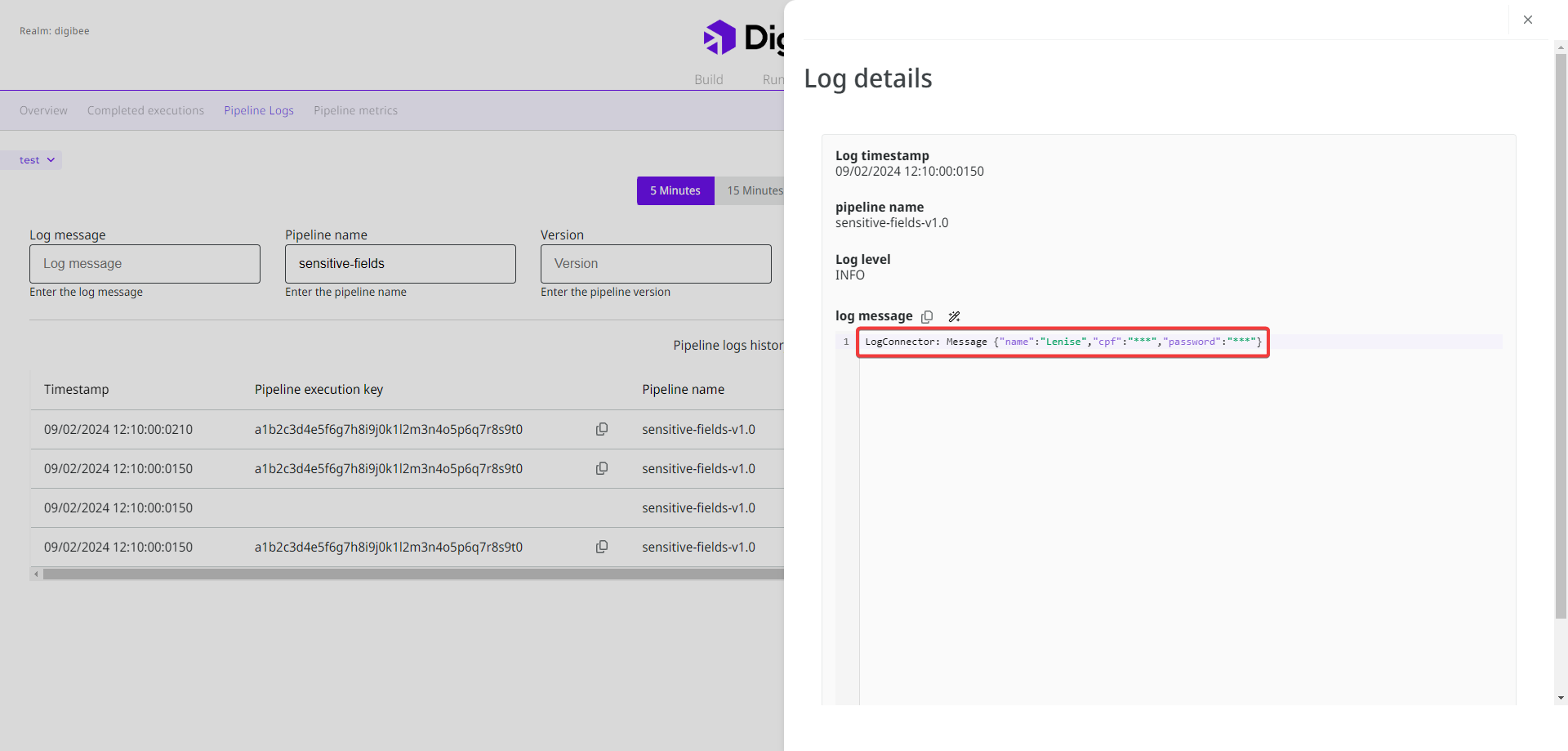
When you set a sensitive field on the Digibee Integration Platform, the information in the [pipeline logs](/documentation/developer-guide/development-cycle/dashboards/pipeline-logs.md) is obfuscated with the character set "\*\*\*". Take a look at the following image:
Log with sensitive fields on the Monitor page.
On the Digibee Integration Platform, you have two options for defining sensitive fields. You can define them:
* For **specific pipelines** in the [pipeline configuration form](/documentation/developer-guide/development-cycle/build-overview/pipelines/how-to-create-a-pipeline.md).
* For the **entire realm**, which then applies to all pipelines simultaneously, in the **Sensitive fields policy**.
The sensitive fields for the realm and the specific pipelines can function independently or be combined. On the Build screen, during the pipeline construction, the data continues to be displayed normally. The policy is applied **after** the pipeline is deployed.
## Example
Suppose you want to obfuscate the sensitive field “password” for all pipelines in your realm, but the field "address" only for a specific pipeline, that we’ll call “Pipeline A”. In this case, you can configure a **Sensitive fields policy** with the “password” field and configure the sensitive field “address” in the configuration form of Pipeline A.
When you deploy Pipeline A, both the "password” field and the "address” field are obfuscated in the pipeline logs. For the other pipelines in your realm, only the “password” field is obfuscated.
## How to configure a Sensitive fields policy
Follow these steps to configure sensitive fields for the entire realm:
1. On the Platform home page, click **Administration** in the upper right corner.
2. Click **Policies**.
3. Open the **Sensitive fields policy** to configure it.
4. Insert the sensitive fields in the text field, separated by commas, for example: addressCode, addressComplement.
{% hint style="info" %}
**Important information:**
* The special character hyphen \[-] is allowed in the name of the sensitive field. Other special characters, accents, and cedilla \[ç] are not allowed.
* Sensitive fields are case-sensitive, so “ID” is different from “id”.
* It’s not possible to use regular expressions (regex) on sensitive fields.
{% endhint %}
5. Click **Add**. The sensitive fields are displayed in a list below. You can remove them by clicking the **X** icon.
6. Click **Save**.
7. A pop-up window will open on the page. Write “I want to edit the policy” in the **Confirmation message** field and click **Create**.
When you save the fields, they are classified as sensitive in all pipelines in the realm.
{% hint style="info" %}
The sensitive fields configured for the entire realm can only be viewed in the **Sensitive fields policy** by clicking the **eye** icon. They are not displayed in the pipeline configuration.
{% endhint %}
Watch the video below to see a demonstration of how to configure the **Sensitive fields policy**:
{% embed url="" %}
## What happens if I edit the Sensitive fields policy?
You can edit the **Sensitive fields policy** at any time. However, to reflect the changes in the pipeline logs, you must redeploy the pipelines that use this policy to apply the new configuration.
When you edit the policy, you can:
* **Add new fields:** the new fields will be obfuscated in the pipeline logs.
* **Remove existing fields:** the removed fields will no longer be obfuscated in the pipeline logs, unless they are configured as sensitive fields in specific pipelines.
---
# Agent Instructions
This documentation is published with GitBook. GitBook is the documentation platform designed so that both humans and AI agents can read, navigate, and reason over technical content effectively. Learn more at gitbook.com.
## Querying This Documentation
If you need additional information that is not directly available in this page, you can query the documentation dynamically by asking a question.
Perform an HTTP GET request on the current page URL with the `ask` query parameter, and the optional `goal` query parameter:
```
GET https://docs.digibee.com/documentation/developer-guide/platform-administration/governance/policies/security/sensitive-fields.md?ask=&goal=
```
`ask` is the immediate question: it should be specific, self-contained, and written in natural language.
`goal` is optional and describes the broader end goal you are ultimately trying to accomplish on behalf of the user. GitBook uses it to tailor the answer towards what is most useful for that goal.
The response will contain a direct answer to the question and relevant excerpts and sources from the documentation.
Use this mechanism when the answer is not explicitly present in the current page, you need clarification or additional context, or you want to retrieve related documentation sections.