> For the complete documentation index, see [llms.txt](https://docs.digibee.com/documentation/llms.txt). Markdown versions of documentation pages are available by appending `.md` to page URLs; this page is available as [Markdown](https://docs.digibee.com/documentation/developer-guide/development-cycle/build-overview/capsulas/public-capsules.md).
# Public capsules
Learn more about how public capsules work and how to use them on the Digibee Integration Platform.
Public capsules are created in a public collection and can be used in all realms within the same SaaS region, unlike private capsules which are only available in the realm they were created. For example, if a public collection is created in the BR SaaS region, the capsules of the collection won't be available in the US SaaS region, and vice versa.
{% hint style="info" %}
The creation of new public collections is currently not available for all customers.
{% endhint %}
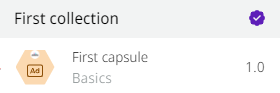
Public capsules are usually created and validated by Digibee and marked with a certificate icon, as shown in the image below:
{% hint style="warning" %}
Capsules that don’t have the certificate icon are not validated by Digibee. Therefore, Digibee doesn’t provide support for problems that may occur when using non-validated capsules.
{% endhint %}
All [versions](/documentation/developer-guide/development-cycle/build-overview/capsulas/capsules-versioning.md) of the public capsules are available in the [Smart Connector User Experience](/documentation/developer-guide/development-cycle/build-overview/canvas/smart-connector-user-experience.md) or on the **Capsules** tab in the palette on the right side of the pipeline.
See the public capsule collections currently offered by the Digibee Integration Platform:
{% content-ref url="/pages/bVKT86wUUwfZZdMKP4AI" %}
[SAP](/documentation/developer-guide/development-cycle/build-overview/capsulas/public-capsules/sap-collection.md)
{% endcontent-ref %}
{% content-ref url="/pages/TMgrZ21srdZpB28RtTTs" %}
[Digibee Tools](/documentation/developer-guide/development-cycle/build-overview/capsulas/public-capsules/digibee-tools.md)
{% endcontent-ref %}
{% content-ref url="/pages/GBVFPrsS4yOxuGWTzryH" %}
[Google Sheets](/documentation/developer-guide/development-cycle/build-overview/capsulas/public-capsules/google-sheets.md)
{% endcontent-ref %}
{% content-ref url="/pages/LfLBB8HiNBCdOxMGoqwm" %}
[Gupy](/documentation/developer-guide/development-cycle/build-overview/capsulas/public-capsules/gupy.md)
{% endcontent-ref %}
{% content-ref url="/pages/l6kl870UeHx7QvSv7072" %}
[Send notifications via email](/documentation/developer-guide/development-cycle/build-overview/capsulas/public-capsules/send-notifications-via-email.md)
{% endcontent-ref %}
{% content-ref url="/pages/YSiU4I3rdtaBLNRGVkaW" %}
[Totvs Live](/documentation/developer-guide/development-cycle/build-overview/capsulas/public-capsules/totvs-live.md)
{% endcontent-ref %}
{% content-ref url="/pages/kwdf8i1cW4f5d7s0HoaO" %}
[Canvas LMS](/documentation/developer-guide/development-cycle/build-overview/capsulas/public-capsules/canvas-lms.md)
{% endcontent-ref %}
---
# Agent Instructions
This documentation is published with GitBook. GitBook is the documentation platform designed so that both humans and AI agents can read, navigate, and reason over technical content effectively. Learn more at gitbook.com.
## Querying This Documentation
If you need additional information that is not directly available in this page, you can query the documentation dynamically by asking a question.
Perform an HTTP GET request on the current page URL with the `ask` query parameter, and the optional `goal` query parameter:
```
GET https://docs.digibee.com/documentation/developer-guide/development-cycle/build-overview/capsulas/public-capsules.md?ask=&goal=
```
`ask` is the immediate question: it should be specific, self-contained, and written in natural language.
`goal` is optional and describes the broader end goal you are ultimately trying to accomplish on behalf of the user. GitBook uses it to tailor the answer towards what is most useful for that goal.
The response will contain a direct answer to the question and relevant excerpts and sources from the documentation.
Use this mechanism when the answer is not explicitly present in the current page, you need clarification or additional context, or you want to retrieve related documentation sections.