> For the complete documentation index, see [llms.txt](https://docs.digibee.com/documentation/llms.txt). Markdown versions of documentation pages are available by appending `.md` to page URLs; this page is available as [Markdown](https://docs.digibee.com/documentation/connectors-and-triggers/connectors/file-storage/google-storage/google-storage-usage-scenarios.md).
# Google Storage: Usage scenarios
Learn the supported usage scenarios when using the Google Storage component in the Digibee Integration Platform.
Take a look at the supported usage scenarios below. For more information about the component, its parameters and operations, [see the Google Storage documentation](/documentation/connectors-and-triggers/connectors/file-storage/google-storage.md).
## Scenario 1: List files
Let's say you have 1 or more files in the Google Storage service and that you want to use the **Google Storage** component in List mode. That way, you'll have access to the list of existing files and their respective folders.
See an example of how to make it possible:
1. Create a pipeline and add **Google Storage**.
2. Open the configuration form of the component.
3. Select an account in the **Account** parameter (keep in mind that this field is mandatory). If you don't have a configured account to access Google Storage, first you need to generate a primary key through the service. [See the external Google documentation to learn more about this process](https://cloud.google.com/iam/docs/keys-create-delete). Afterwards, configure an account in the Digibee Integration Platform.
4. Select the List option in the **Operation** parameter.
5. Configure the other mandatory fields of the component (**Project ID**, and **Bucket Name**) and the optional as well (**Remote Directory**, **Page Size** and **Page Token**).
6. Click on **Confirm**.
7. Connect the trigger to **Google Storage**.
8. Run a test in the pipeline (CTRL + ENTER).
9. You will see a list of the available files in **Google Storage** according to your determined specifications:
```
{
"content": [
{
"name": "DGB-413/",
"contentType": "text/plain",
"contentEncoding": null,
"createTime": 1552394033410,
"bucket": "digibee-test-digibee-test-bucket",
"size": 11
},
{
"name": "DGB-413/iso-8859-1-test.txt",
"contentType": "application/octet-stream",
"contentEncoding": null,
"createTime": 1579552641265,
"bucket": "digibee-test-digibee-test-bucket",
"size": 65
}
],
"pageToken": "ChtER0ItNDEzL2lzby04ODU5LTEtdGVzdC50eHQ=",
"fileName": null,
"remoteFileName": null,
"remoteDirectory": "DGB-413",
"success": true
}
```
As you can see in the example above, the chosen option was "PageSize 2", which means only 2 files will be listed. If there's no value specification in this field, then all the files will be listed.
However, we recommend you to specify the value, because if you don't it can jeopardize the performance and data recovery time. Take a look at the next scenario and learn how to iterate multiple files without affecting the safety and performance.
## Scenario 2: List multiple files using pagination
Let's say you have a great amount of files in your Google Storage and that you want to use the **Google Storage** component in List mode. That way, you'll be able to list the files using pagination.
To do that, you must:
1. Create a pipeline and add **Google Storage**. Define the **Step Name** parameter as "List-1".
2. Open the configuration form of the component.
3. Select an account in the **Account** parameter (keep in mind that this field is mandatory).
4. Select the List option in the **Operation** parameter.
5. Configure the other mandatory fields of the component (**Project ID** and **Bucket Name**) and the optional as well (**Remote Directory**, **Page Size**, and **Page Token**).
6. Click on **Confirm**.
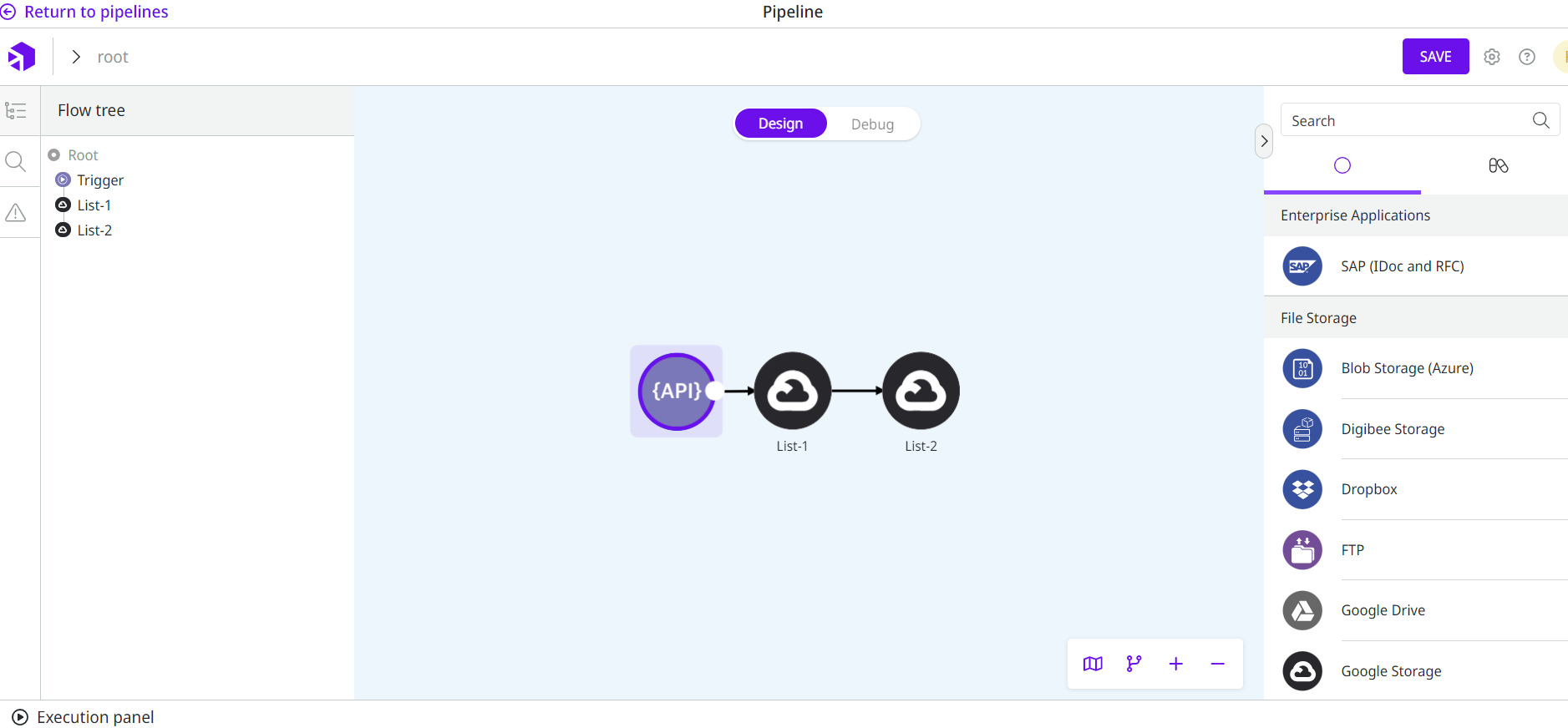
7. Add a second **Google Storage** component in the pipeline and define the **Step Name** parameter as "List-2".
8. Open the configuration form of the second **Google Storage** and select the account and the operation, repeating steps 2, 3, and 4.
9. Configure the mandatory fields of the component one more time (**Project ID**, **Bucket Name**, **Page Size**, and **Page Token**) and the optional as well (**Remote Directory**). Define the Page Token with the following Double Braces expression:
`{{ message.pageToken }}`
Double Braces give access to the previous component output. Given that, the Page Token generated by the first **Google Storage** ("List-1") allows the next files listing page to be fetched to the second **Google Storage** ("List-2").
10. Click on **Confirm**.
11. Connect the trigger and the components:
12\. Run a test in the pipeline (CTRL + ENTER).\
13\. You will see a list of the files available in your Google Storage service according to your determined specifications:
```
{
"content": [
{
"name": "DGB-413/iso8859-2.txt",
"contentType": "text/plain",
"contentEncoding": null,
"createTime": 1552395963553,
"bucket": "digibee-test-digibee-test-bucket",
"size": 55
},
{
"name": "DGB-413/utf-16-test.txt",
"contentType": "text/plain",
"contentEncoding": null,
"createTime": 1552394973030,
"bucket": "digibee-test-digibee-test-bucket",
"size": 70
}
],
"pageToken": "ChdER0ItNDEzL3V0Zi0xNi10ZXN0LnR4dA==",
"fileName": null,
"remoteFileName": null,
"remoteDirectory": "DGB-413",
"success": true
}
```
As you can see in the example above, the output shows only the files of the last page (generated by **Google Storage** with the name "List-2"). However, it becomes clear how you can use the Page Token to access consecutive pages.
## Scenario 3: Download file
Let's say you have a file in your Google Storage and that you want to use the **Google Storage** component in Download mode. That way, you'll have access to a specific file to be used by the pipeline.
Check how to do that:
1. Create a pipeline and add **Google Storage**.
2. Open the configuration form of the component.
3. Select an account in the **Account** parameter (keep in mind that this field is mandatory).
4. Select the Download option in the **Operation** parameter.
5. Configure the other mandatory fields of the component (**Project ID**, **Bucket Name** and **Remote File Name**) and the optional as well (**File Name** and **Remote Directory**).
6. Click on **Confirm**.
7. Connect the trigger to **Google Storage**.
8. Run a test in the pipeline (CTRL + ENTER).
9. You will see a confirmation of the file existence and availability in the pipeline, with the specified file name:
```
{
"fileName": "iso-8859.txt",
"remoteFileName": "iso-8859-1-test.txt",
"remoteDirectory": "DGB-413",
"success": true
}
```
## Scenario 4: Upload file
Let's say you have a file in the pipeline and that you want to use the **Google Storage** component in Upload mode. That way, the specified file becomes available in your Google Storage service.
Know how to do that:
1. Create a pipeline and add **Google Storage**.
2. Open the configuration form of the component.
3. Select an account in the **Account** parameter (keep in mind that this field is mandatory).
4. Select the Upload option in the **Operation** parameter.
5. Configure the other mandatory fields of the component (**Project ID**, **Bucket Name** and **File Name**) and the optional as well (**Remote** **File Name** and **Remote Directory**).
6. Click on **Confirm**.
7. Connect the trigger to **Google Storage**.
8. Run a test in the pipeline (CTRL + ENTER).
9. You will see a confirmation of the file creation in Google Storage, with the specified remote file name and remote directory:
```
{
"fileName": "iso-8859.txt",
"remoteFileName": "iso-8859-upload.txt",
"remoteDirectory": "DGB-413",
"success": true
}
```
## Scenario 5: Delete file
Let's say you have a file in your Google Storage and want to use the **Google Storage** component in Delete mode. That way, the file is removed from your Google Storage.
To do that, just follow these steps:
1. Create a pipeline and add **Google Storage**.
2. Open the configuration form of the component.
3. Select an account in the **Account** parameter (keep in mind that this field is mandatory).
4. Select the Delete option in the **Operation** parameter.
5. Configure the other mandatory fields of the component (**Project ID**, **Bucket Name** and **Remote File Name**) and the optional as well (**Remote Directory**).
6. Click on **Confirm**.
7. Connect the trigger to **Google Storage**.
8. Run a test in the pipeline (CTRL + ENTER).
9. You will see a confirmation of the file removal from your Google Storage:
```
{
"fileName": null,
"remoteFileName": "iso-8859-upload.txt",
"remoteDirectory": "DGB-413",
"success": true
}
```
---
# Agent Instructions
This documentation is published with GitBook. GitBook is the documentation platform designed so that both humans and AI agents can read, navigate, and reason over technical content effectively. Learn more at gitbook.com.
## Querying This Documentation
If you need additional information that is not directly available in this page, you can query the documentation by asking a question.
Perform an HTTP GET request on the following URL with the `ask` and `goal` query parameters:
```
GET https://docs.digibee.com/documentation/connectors-and-triggers/connectors/file-storage/google-storage/google-storage-usage-scenarios.md?ask=&goal=
```
`ask` is the immediate question: it should be specific, self-contained, and written in natural language.
`goal` is what the user is ultimately trying to achieve, the reason they need the answer. Sharing it helps GitBook give you a better, more relevant answer. A goal is most helpful when it describes the outcome the user wants rather than restating the question. For example, with `ask=how do I create an API token`, a goal like `automate deployments from our CI pipeline` lets GitBook tailor the answer to that use case.
The response will contain a direct answer to the question and relevant excerpts and sources from the documentation.
Use this mechanism when the answer is not explicitly present in the current page, you need clarification or additional context, or you want to retrieve related documentation sections.